
You can't post raw audio to Twitter directly. It sucks. Sure, you can post links to audio, but it's not quite the same. Here's a couple of Linux one-liners which will turn audio into simple video suitable for uploading to social media. Waves This converts audio to a waveform: ffmpeg -i input.mp3 -filter_complex "[0:a]showwaves=s=640x480:mode=line,format=yuv420p[v]" -map "[v]" -map 0:a -c:v…
Continue reading →

Steganography (/ˌstɛɡəˈnɒɡrəfi/ is the practice of concealing a file, message, image, or video within another file, message, image, or video. I recently saw someone tweeting the hashtag #ManchesُterDerby Do you see an odd character in the middle? It's an Arabic Damma (U+064F) - a vowel character. Although it comes after the "s" in Manchester, it appears after the "t" because it is a Right-To…
Continue reading →
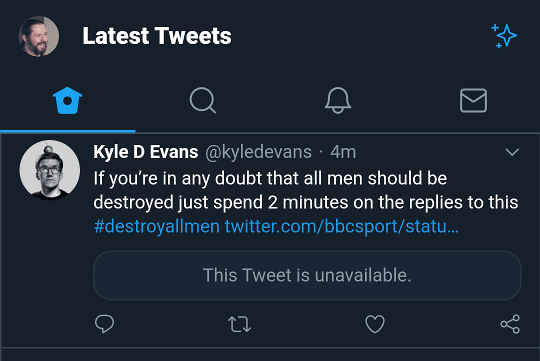
For the sake of my mental health, I've blocked a few people and organisations on Twitter. They can't see what I do, and I can't see them. I'm sure you've done the same to a celebrity or pundit you just can't stand the sight of. Perhaps you have an abuser you'd rather not have thrust in your face. The blocking tool is pretty handy! Except it doesn't work the way I would expect it to. Here's an …
Continue reading →

Back in 2014, I set up a rather silly Twitter account - @OxfordSolarLive. The premise was simple. A camera took a photo of the sky above my house. It took a reading from my solar panels to see how much electricity they were generating. It superimposed the reading on the photo. Then posted it on Twitter. Solar Realtime Edent@OxfordSolarLive1206 watts. pic.x.com/ip2cp5rrao❤️ 0💬 0🔁 014:11 - Fri 24 …
Continue reading →

It seems that Twitter has lost control of its advertising system. This blog post will show you why it is dangerous to click on any Twitter advertising. Twitter ads have always been a bit crap, but I've seen a recent influx in outright scams. Let me step you through a couple of examples. A typical click-bait headline. What has our favourite celeb done this time? In a moment of weakness,…
Continue reading →

Twitter has a problem with scam advertising. Rather than having humans manually check adverts for acceptability and authenticity, they let almost anyone promote anything. Whatever meagre protections they build in are rapidly evaded by the scammers. Let's take a look at an example of a promoted crypto-scam about Singapore. I'd say it was obviously a fake, but Twitter says this story comes from…
Continue reading →

Imagine the scenario. You're trying out some cool new Twitter app. It asks you to sign in via OAuth as per usual. You look through the permissions - phew - it doesn't want to access your Direct Messages. You authorise it - whereupon it promptly leaks to the world all your sexts, inappropriate jokes, and dank memes. Tragic! What's going on? Many years ago the official Twitter API keys were…
Continue reading →

Twitter has an undocumented feature which lets you follow accounts without being logged in. Here's how I found it, and how you can use it. My crappy old TV has a crappy old web browser on it. One boring Sunday, I decided to see which websites worked and which didn't on a 6 year old browser. Anything using LetsEncrypt was unavailable due to "security certificate issues" - but Twitter worked.…
Continue reading →

Update for 2019! Twitter have changed how they compress images. Some of the techniques in this blog post may be out of date. Let's talk image compression! Services like Twitter will often apply aggressive levels of compression in order to reduce their storage space and decrease download times. This can have negative consequences for usability and image quality. Here's an example - this detail…
Continue reading →

(This isn't really a security issue, although I've disclosed it to the Twitter team.) "Fuzzing" is a computer science term which means "sending weird data into a program and seeing what happens." It's a useful way to see how your code can break in new and unexpected ways. It's particularly good at showing what a website's search engine does when it is confused. For example, here's a fairly…
Continue reading →

The Video Terence Eden is on Mastodon@edentEVERY EMOJI! pic.x.com/2fcuqwu67c❤️ 1,306💬 54🔁 020:09 - Tue 24 October 2017 Download the WEBM version (19MB). The Process Mostly notes to myself, but I thought you lot might be interested 🙂 Get Every Emoji from Twemoji Twitter maintain the Twemoji Project - it contains high quality SVGs of every emoji. They generously make them available under CC-BY…
Continue reading →
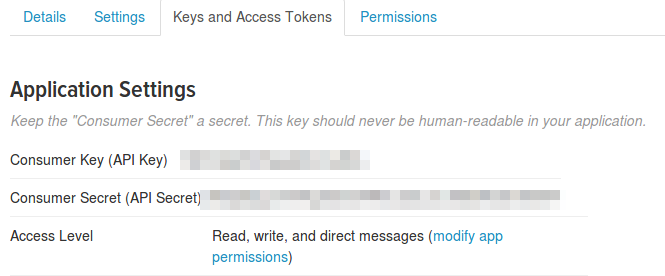
Here's a very simple introduction to getting started with Tweepy - a Python program which lets you access Twitter. This will work on small computers like the Raspberry Pi. Everything here takes place in the Terminal on the Command Line. This should work on Windows and Mac - but I'm using Linux. Get Python Open your terminal or command prompt. Type python You should see something like: …
Continue reading →
