

I've been blown away by the number of comments and visits to my original review of the 511EB. To clarify some of the points and answer some questions, I've decided to post another video review. This shows the speed of page turning and some of the idiosyncrasies of the eReader.
Run VT, Errol!
Startup Screen

Click to download full size
I've set my startup screen to show my phone number and email address. Combined with the startup password, it's a fairly simple way to protect your device and hopefully get it back if lost. Of course, all of your books can be taken from the SD card - so make sure you've got a backup!
Click on the above image to download the file. Edit it to show your details then save it to the root directory of your SD card as "start.jpg". Unplug your reader and press "5" Settings. Press the right arrow twice. Press down twice to select "System Maintenance". Then press "3" Startup Pic. If it has found the file, press enter to confirm. You can always change your image again to anything you like.
Screen Refresh
The refresh rate is extremely fast. This is because it uses a "Partial" refresh rather than the traditional "Global" refresh. The advantage of this is speed, and you don't get the momentary inverted screen that you do on other readers. The disadvantage is that you can - if you look very very closely - see the faint trace of an after-image. You can just about make out the ghosts of previous letters. Even after 50 page turns, they aren't distracting - but you can hit the refresh button on the keyboard to make them go away. You can also go into the settings menu and set the screen refresh to "Global".
Bugs
- Some have noticed that the 511EB displays Chinese characters where it should be displaying accented European characters like á - this is due to the way files are saved. If they are in UTF-8 format, all characters display correctly.
- The typesetting is a little off. It doesn't force a hyphen into words like a traditional book (this is a good thing), but it breaks the line at any punctuation.
As you can see, when I say "
That's a nice book." the line
wraps at the wrong place. It'
s slightly annoying.
- On the default set of books, some of the words run together. It's arguable whether this is a bug in the book file or the reader - either way, it should have been fixed during QA before release.
- Searching for books works, but looks like it doesn't. Because there are no numbers by the files, it's not immediately obvious what you have to do in order to select them. The search box takes up the first two "rows", so to select the first book it finds, press "3". For the second, press "4" - and so on.
- Text-To-Speech is a nice gimmick, searching within a book is very useful. Yet they're both absent from PDFs and the hugely popular EPUB formats. I cannot fathom it. They're both rendered as text on the screen - so what's stopping the reader from searching and speeking?
- Mac and Linux compatibility. This is a Windows CE device - but there's no reason for it not to work on other operating systems. If a simple card reader from PoundLand can work, there's no reason why this cannot. Removing the card isn't hard, but it's an annoyance for those of us not on Windows.
- The keyboard is slightly wasted. There is no note taking facility. The password screen only accepts numbers. Yes, it works, but it could be so much more. The placement of the Delete key is odd. It's next to the spacebar. I'm used to the delete key being above the enter key. On this model, that's the cancel key. So, rather than deleting a character, I often find myself cancelling.
- The Title Bar shows the title of the book you're reading. Fair enough. But it truncates it for no apparent reason. So, if your book is titled "Lewis Caroll - Alice in Wonderland", all you'll see is "Lewis Caroll - A..."
- The truncating is present on the Bookcase. If your books are titled "Cory Doctorow - Ander's Game" and "Cory Doctorow - After the Siege", all you'll see is "Cory Doctorow - A..." - good luck working out which is which! The solution is to save books in folders. So, for example, I have
|-- e_book
|   |-- Cory Doctorow
|   |   |-- Ander's Game.txt
|   |   |-- After the Siege.epub
|   |-- Lewis Caroll
|   |   |-- Alice in Wonderland.txt
|   |   |-- Alice Through the Looking Glass.epub
- PDF zoom. PDF is a rubbish format for an ebook. The page paradigm really doesn't work when you're on a screen. When the 511EB zooms in to a PDF, the page down button litterally takes you to the next page - not the next part of the page you're on. You have to use the arrow keys to scroll around the page.
Finally, there's no screen rotation. To be honest, this isn't a feature I'd ever use - but some people like to have it.
Conclusion
As I said before, this is a cheap and cheerful ebook reader. The speed of page turning speed is impressive. EPUBs and PDFs work well, but missing some of the extra features like searching and Text-To-Speech. It handles large files - although performance takes a slight hit. The build quality is what you would expect, a bit cheap and plasticy. But it only weighs 190 grammes. The quality of the keyboard is sufficient and the display is as good as any other eReader.
A Word on Waterstone's
Given the number of bugs (admittedly, fairly minor) it seems odd that Waterstone's are heavily promoting this model. My local shop has 3 rather prominent displays. To dedicate so much space without even testing the unit takes some bravado. They have taken over half of their window display.

511EB in the window of Waterstone's
They have a whole book case devoted to the unit.
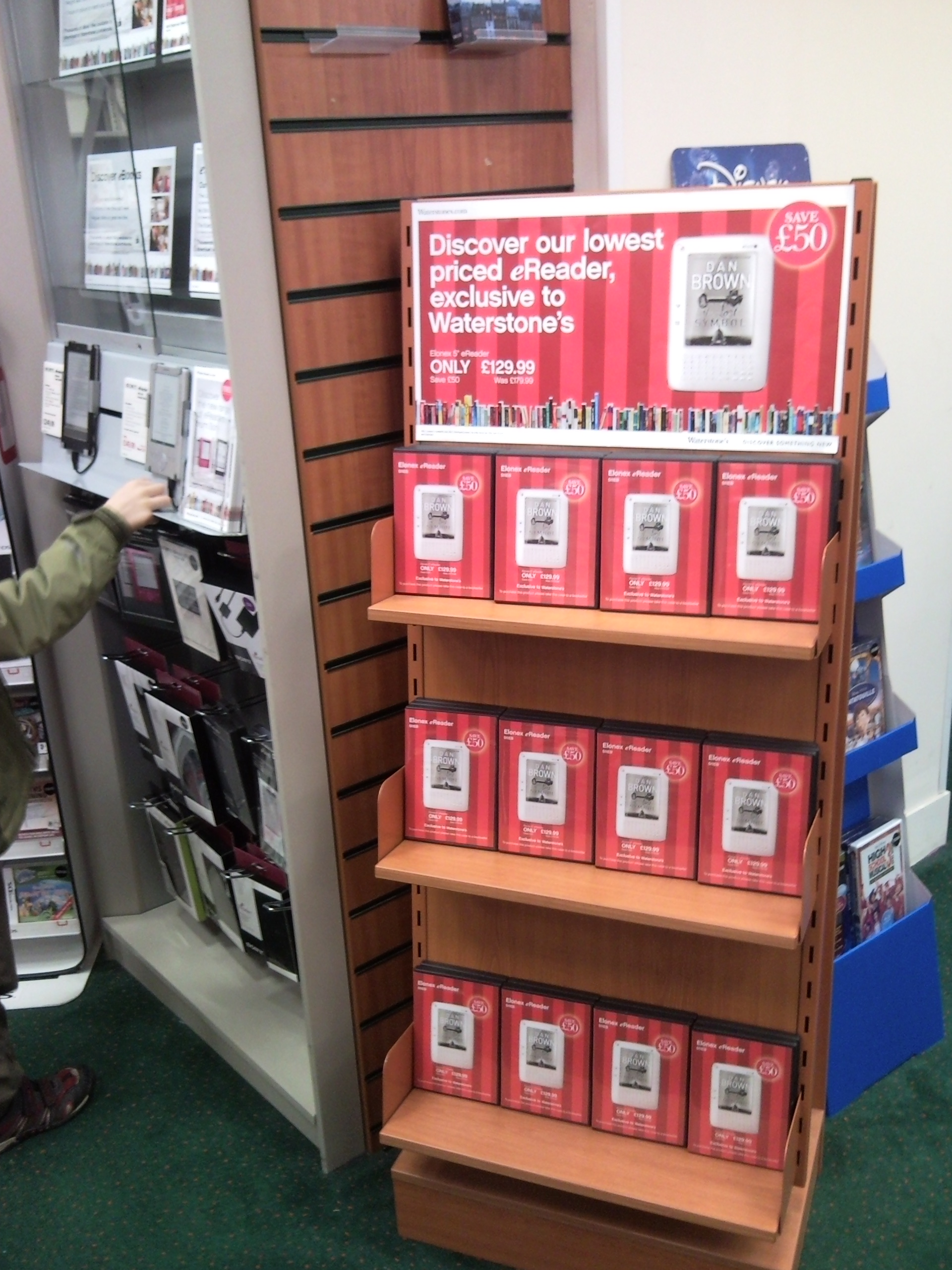
Heavily Promoted
They're also putting it up against the much more expensive Sony eReaders.

Dummy Model
Yet they're not as committed to this as you may think. There are no working models on display. With the Sonys, you can try them out, see if they're fast enough, explore their menus - the lowly 511EB gets a cardboard dummy.
The majority of questions people have asked me could have been answered by having a working model. The Waterstone's website is also full of people asking basic questions. Questions which really should have been preemptively answered on the site. I've registered with the site so I can answer some of them, but a device like this deserves more information up front. Elonex - the reseller of this device from Hanvon - have committed to firmware updates. I hope, for Waterstone's sake, that they come out quickly and regularly. Otherwise, Waterstone's will face a lot of angry customers and will set back the progress of eReader adoption.


135 thoughts on “Waterstones Elonex 511EB Review - Part 2”
Neil
Thanks for getting all this info together I wish I had read this first, all the information I needed yesterday.... Oh well I'm a Mac user and my card reader doesn't take micro SD cards so I'll have to wait to try out the books I've already downloaded. Or until Elonex get their act together. I am mostly peeved about the note taking issue as I bought this after being assured it would work by a seemingly knowledgeable sales assistant in Bristol. (Strange but true)
I've left quite a snotty review on Waterstone's Website so hopefully someone in marketing will notice and start making phone calls soon.
Stacie
Is there any way to make the rdf files any more readable, I have hundered on ebooks i bought before e-readers. Bought this thinking it would be great to read them on the go, but the font is so small i can barely read it. Zoom just makes it worse as i have to scroll all over to read it all. Anyone found a way to help this?
Hi Stacie, I assume you mean PDF? The nature of PDF means it is a fixed page layout - you see exactly what the author intended.
You can use the free Calibre software to convert the PDFs to a more suitable format like EPUB. The software runs on Windows, Mac and Linux.
The quality of the conversion will depend on how the PDF is formatted - I've found that it's usually good, but sometimes the ends of lines come where you least expect them. Have a go and see if it works for you.
Hope that helps T
Stacie
Yes sorry I meant PDF, typing too fast for my own good. Will try this Calibre Software out. Thank you for the help.
Mark Oates
Slightly annoyed that textual note taking isn't implemented on the 511EB after all. I had hoped that the device would have the basic Notepad/Wordpad text editor on board for rattling off a quick note to the SD card, but apparently that's only implemented on the tEB and Elonex have no plans to do the same for the EB.
I am impressed with the device otherwise - more so than the Iriver Story and even the Sony PRS-505 - mainly because it's the first eReader which can properly handle Word files in their native DOC format rather than via conversion to RTF as the Sony insists on. Although it's supposed to handle DOC files, the Iriver Story makes a dog's breakfast of text sizes, only being readable in the smallest font which is borderline too small. While the 511EB doesn't display DOC files perfectly, it does display them satisfactorily for use as a proofreading device, which is what I've been after since day one.
Now all I need is a case to keep it in.
m amos
No need to be annoyed anymore - they are going to introduce in early feb as per their site. Nice addition that makes this more than a bargain!
Both the 511EB and the 511tEB have a firmware update release to address some small issues experienced with reading certain eBooks. While these updates are available to install now, Elonex will release a further update in the first week of February to address some minor unresolved issues and also add additional note taking functionality to the 511EB. It is therefore recommended that you wait for the next update which will be available from this webpage.
Lorna
Firmware update now available on Elonex support page, although they are recommending we wait for a further update in February rather than download this one?!?!
Adam
Firmware update seems to be corrupt. I've tried it twice and I get the following message:
Update package update.bin is damaged. Please download update package again!
Or is it just me?
Chris Le Bas
I tried to download the update package to solve a lock up problem I get when trying to open a downloaded (purchased) book. The second part of the package appears to have been removed from the Elonex web site. I think I'm going to go and hand the thing back to Watestones and get a Sony.
Mark Oates
The update news is very cool. I'll wait for the Feb update, but the note-taking will be the icing on the cake for the Elonex. I'm pretty chuffed with it as it stands, but that will make it IMHO the best ereader on the market.
I've made myself a makeshift fast-and-dirty cover for the Elonex with the leather cover off an old diary that's the right size. Sheet of lining card to make it look neat and two straps of self-adhesive velcro to hold the Elonex in place. Not the most elegant solution but functional and virtually free.
I think I watched too much Blue Peter as a child....
Paul Browning
I've just downloaded and run the current update from the Elonex site successfully. The device has updated from System version 0.35 to 0.41.
Update process itself was very straightforward (took just long enough for me to to start thinking it had gone wrong though)
The new version has tweaked the interface somewhat. The main menu has some changes with a new Digital Editions entry for DRMed books.
Most significantly the default font seems to have shrunk somewhat, with a book that was previously 800-odd pages on the smallest font now coming in at 600.
It'll be interesting to see what the update in early Feb brings to the device
Ian
Just spoke to Elonex customer services, New firmware update is in the next 2 weeks. Along with a separate charger, and a case at some point in the future.
Strangely Waterstones have said that once it's sold out they will no longer be stocking it, as it was only a limited edition???
Very strange
Nick
When I bought mine the assistant explained that they were meant for Borders so Waterstones were able to buy them cheaply. Consequently, they were just "dropped" into branches after Christmas and staff have had no training with them.
Darren
Borders went bust around Christmas, Waterstones bought them off the administrators hence why they are selling them cheap and why they are not re-stocking.
Chris
What settings do you find work best for converting files for the reader when using calibre. I've used the default settings as our reader isn't listed and while OK I find that chapter headings are often down the page and curiously there is a small page number on the left hand side sometimes overwriting a word. Not sure if this is due to the conversion or something else. I'm using the smallest font to read.
A J Edwards
For those who want a reasonably priced leather cover for the Elonex 511EB. I went to Staples and bought a black leather journal with the inside removable/changeable. I then put the 511 in the leather case with 4 velcro tabs. Total cost £12.00. Looks excellent.
How do I post photographs?
Jeffrey Wilson
Yes I have trouble, my pc is authorised with ADE the books bought from Waterstones appear in a bookshelf, alson on the Elonex 511, but, then a annoying box pops up saying no valid lisence for this book, useless do not buy. Have been in touch with Waterstones, Adobe, and Elonex they all do not want to know, the just send you round in a never ending circle of excuses, the ebook is on sale somebody should take responsibilty for product, I am going to my local Waterstones this morning, somebody is going to have is day spoilt. Jeff
Chris Le Bas
I have had my 511 for 3 weeks now and still can't use it other than to read the freebies that came with it - complete with rather a lot of typos -despite installingthe firmware update. Is anyone else haveing problems opening books via Digital editions?
Alastair
I can't help you with getting Digital Editions working, but just to tide you over, here are a load of free eBooks sans typos: http://www.gutenberg.org/wiki/Main_Page
If you get the epub versions, you can just copy them straight onto the device in Windows.
Paul Browning
Chris, I've only tried one commercial ebook so far but I was able to get that onto the reader without too much trouble. That is once I worked out that there wasn't a "Transfer" button in Digital Editions and that I needed to manually drag the books from the library onto the Ebook reader icon on the left.
What problems are you encountering ?
Chris Le Bas
Paul, I can drag the book to the 511 so that it appears in the library (in the Digital Editions file which was installed with the firmware update). However, when i try to open the book, the reader locks up after opening a note saying "processing".
Alastair - thanks for the link.
Stacie Lawrinson
@ Chris,
I have been having the same issue with my one as well. Just seems to lock up randomly on some books. Also have an issue where it wont let me open anything as it says I have less then 10mb memory left, all though my memory is 79% free. Hoping the firmware incoming will address this.
Colin Hayter
I bought my Elonex 2 weeks ago, and allowing for known bugs was very happy with it. i have also managed to install the firmware update from Elonex which installed OK (apparently) and seems to have fixed my free book problems as well as allowing UK date and time formats to be entered in settings. However, when I try to open the book bought from waterstones, (visible and readable on my PC screen0 I get the message 'No valid license for this book'. have raised the issue with Waterstones on line but so far no response. i see that several other people on the waterstones site are also having the same problem. Not sure whether its formware or Waterstones site or Adobe - but very frustrating.
Martin James
I had the same issue as Colin had. After a number of frankly useless calls to Elonex, Waterstones and Adobe, I eventually sorted it myself. Apparently after you install the update, you also slightly change the id of the device so even though Adobe Digital editions still see's it, it's not allowed to add bought EPUB files to it. To fix this, you need to go to page 4 off the settings menu, and deactivate the DRM setting. Once you've done this then when you reconnect to your PC and start Adobe DE, it will ask you to re-authorise your new reader. Once done, your bought books (which might need to be reloaded onto the reader, not sure on this bit as I had deleted all mine of the reader first) should work fine. Hope this helps.
Kate
Thanks for posting your fix Martin - although it didn't work for me (I don't have that setting on page 4 of my 511EB), it gave me the incentive to keep trying. I'd like to tell everyone with the same problem what worked for me but I'm not entirely sure. I deauthorised my Digital Editions software (CTRL+SHIFT+D) and then reauthorised it. This meant when I reconnected the e-reader, it asked me to authorise it again. I'm not sure this was the problem though because the first time I did this it didn't work. HOWEVER I tried again and this time after I reauthorised the reader, I chose Safely Remove Device from the task bar instead of right-clicking the reader in Explorer and selecting Eject which is what I did before. Hope this helps!
Karl H
been looking at ereaders for a couple of months only just got past the thought process of them being a gimmick, but my ever expanding library is now conflicting with a lack of space caused by my wifes house renovation plans and my 2 four year olds stated intent to single handedly support the global toy market, so this seems like the perfect solution..... mmm 511 for £129 at waterstones or the 600 for £149 at ASDA direct...decisions decisions, any thoughts???
RJ
I have recieved my ereader elonex 511eb! i downloaded a book from waterstones and like some other people i got the message "no valid licence for this book" i had no luck with waterstones or adobe! so some how my partner opened up my ereader on elonex website not sure how but the book downloaded on the ereader..
Martin James
Try installing the firmware update and then following my advice a couple of comment above, I had the same problem and Waterstones were useless, as was Elonex and Adobe!
michael j
Hi Terence, thanks for the review(s), very informative + helpful, and I've just bought one of these from Waterstones... I wanted to ask does anyone else's reader have quite a pronounced flex to the right side of the screen, so when you press the case down it makes a creaky/squeaky noise? I just want to check whether it's a problem with mine or just the way they're made. Cheers v much for any input!
Hi Michael, It's not a problem I've noticed on mine. The plastic is fairly flexible - so leaving it under a heavy book overnight should correct it. If you think it's defective, take it back to Waterstones.
T
RJ
Yea i noticed mine had a slight squeak to the right side!
Chris Le Bas
I have tried all the suggestions from the many helpful offers on this thread, but am still unable to open all but free books on my reader. The Elonex website still promises a fix in the first week of Feb - not now due untl the end of this week because to quote customer service "unfortunately for all of us" they haven't got it to work yet. What a way to run a business!
Chris Le Bas
Having run out of patience with Elonex and my 511 not being fit for purpose, I attempted to return my 511 to Waterstones today. They refused to take it back and said that it was Elonex's responsibility. This is certainly not good customer relations behaviour on Waterstone's part. I am checking to find out what the law says about Waterston's responsibilty. Meanwhile I wont be shopping there again.
karl h
its not just waterstone's who try to avoid their responsibility under the sale of goods act, dixons/curry;s/pc world are notorious for it as well, trying to pass all responsibility onto the manufacturer, sale of goods act clearly states that the contract is between you and the seller not the manufacturer and it is the responsibility of the seller to deal with any issues you may have within reason. http://www.berr.gov.uk/whatwedo/consumers/fact-sheets/page38311.html
Chris Le Bas
Thanks Karl. I have written to Waterstones siting the Sale of Goods Act - we'll see what happens.
steve
Bought one yesterday and v happy with it - but tried to listen to music and read a book and got the processing box -nothing happened So I opened the book first and then clicked onto the music button and I can't get any music to play -I have updates the firmware
Darren
Love the review and the device pretty good. Seems to have problems with embedded images ie Stephen King Under the dome has an image on page 8 and 9 and the device freezes (after firmware update too). Can by pass this by jumping the pages. Have contacted Elonex and waterstones.
EmmaRB
Could you give any advice on how to search an eBook such as the Bible? How would I jump to a chapter and verse, say Matthew chapter 14? any suggestions for format I need to use ePUB? etc would be a lot of help... as you can tell, I'm technologically challenged! Thanks!
The 511EB doesn't allow for searching within ePUB - you'll need to find a .txt version. I don't know whether searching will be fixed in later software releases - you might like to ask Elonex about it. In the meantime, you may find this book to be of more use to you.
EmmaRB
Thanks for advice! I've already read your recommendation... a good read! Will probably buy it as an eBook too!
Stephen Biddall
Thats naughty Terence! Dont go getting all atheistic on us!
Too late for that, Stephen. I'm a committed apathist - http://shkspr.mobi/blog/index.php/2009/11/apathist/
Gerry Potter
Hello Terence Eden,
I have an ePub BooksDVD 2.0
No Removable Disk appears on my computer when connecting USB cable from the Elonex. Can you help?
Hi Gerry, I don't know what "ePub BooksDVD 2.0" is, do you have a link for it? Are you running Windows, Linux, or Mac? Either way, try updating the firmware in your 511EB to see if that fixes things. If it doesn't, buy a cheap SD card reader from PoundLand and use that to copy files on to the card. Thanks
T
Alastair
Also ensure that once the cable is connected, you switch the Elonex reader on (in the usual manner). At this point the screen of the reader should display a message asking you to allow the connection. Once you OK that, the removable disk should appear.
Spoken to Elonex. The firmware update should be out by the end of NEXT week. But it might be earlier or later - they weren't sure.
Once it's available, I'll be doing another blog post showing you how to update it, what new features it has added and what bugs have been fixed.
If you'd like to speak to Elonex, their number is 0871 222 3456
T
Darren
I hope it fixes a problem I have with Under the Dome by Stephen King. The publishers told me it should be ok and it must be a problem with the Reader.
Elonex are aware of the problem and I'm just waiting on a response.
just got mine today, so working out the kinks,
One question I have, the items at the bottom of the screen, page numbers etc, etc, can that be turned off, I really want my pages to be full screen, and not have to keep pressing the down arrow to read cut off txt.
Also on that similar problem, what are the best settings so I can do just that, have full pages, that require only a click to turn page.?? thanks, great blog by the way, made me buy the product.
simon
i'm sorry to say I have had nothing but problems with this e-reader. I bought the first one at the beginning of February, which had to go back due to an intermittently dodgy OK button. I am yet to get the second one working. I load files on to it and it seems fine initially but then when I take it somewhere with me, the moment I turn it on it gives me the message 'free space of SD card is less than 10M' ??? and I cannot operate the unit at all. This despite the fact I still have over 1GB of memory free on the reader!
I was waiting for the firmware update which was supposed to be released the first week of February but has constantly slid and was then promised for 2nd March. At time of writing it has STILL not been released. I thought that might fix it but as they don't seem to be keeping their word I have no alternative but to try and take it back for a refund, which is doubtful after a month, so I may end up throwing the pile of crap in the bin.
It is a real shame Elonex! You could have had a real winner on your hands... cheaper than everyone else and feature rich. However the poor build quality and laughable support has negated any benefits. I won't be going near your company again that's for sure.
simon
Oh yeah and it only intermittently shows up as an external usb hard drive on my pc as well which means I can't even access the files most of the time!
simon
Correction... it now won't connect AT ALL via usb, despite trying it on 3 different pcs with 2 different operating systems, which means I couldn't update the firmware even if they ever release it! It now also won't turn off!!! If I do take it back it means that I would have to return it with all my personal files still on it (though whether they could access them themselves is debatable!). Great! Oh and there's still no case available.
My advice: STAY AWAY FROM THIS COMPANY AND ITS PRODUCTS UNLESS YOU LIKE WASTING YOUR MONEY!!!
Now where's the bin.
Simon I feel your pain mate, But it does sound to me you have a problem somewhere, that a few things can be tried. As you say you have tried the reader in more than 1 pc, that rules out my theory of usb problems, which as a PC tech I can tell you are many, were usb are concerned.
Now as for your files, that is an easy problem to solve, by just getting a standard card reader to read the memory card, you can also add files and take them off this way to, you do not need the reader in order to work with the data.
Personally I would in your shoes, try getting the card in the reader, and see were that takes you, you could find that is the problem. I dont know if there bare files are anywhere to download,but I would do just that, format the card, and then put new clean files on there.
Now I'm not going to sit here and say the reader is great, you will not want to hear that. And I do feel your pain, believe me I work with PC's, most stressful job on earth,.
Anyway I urge you not to give up, yes its frustrating, but the reader for the price, is a top product. And you are within your rights to demand your money back if you have a faulty item.
I wish you luck.
Ju
Jack
simon: Try the MicroSD card in another card reader and see if it works. Or try a new MicroSD card in Elonex and see if it works. I don't understand how so many people are having problems with it. I've had only 1 problem and I caused it. The lock button broke. I had to super glue it back now it's better than new 😀 The only real problem with this is reading PDFs is a real pain, but this is because of how PDF is. If you got a file in .PDF .TXT, .HTML, .CHM etc use Calibre to convert them to ePub. 511EB reads ePubs perfectly. (You will have problems with conversion from PDF, because it's a pain to convert from PDF)
Elliot Muir
Hello! Great review thanks. I was wondering if PDFs when re-flowed will only need the next page button to go to the next page? I would only be looking to read text-only PDFs that are DRM-ed.
Yes, when using reflow you can use the page down button or the down or right arrow to move to the next screen.
I assume you mean aren't DRM'd.
Elliot Muir
Thanks. I mean PDFs that have to go through Adobe Digital Edition for example, Fictionwise sell PDFs and EPUBs that are protected by copyright http://www.fictionwise.com
Thanks for the quick reply though 🙂
I have downloaded, "calibre" as recommend here, what that has done, is changed any of my books irrespective of type, I then told it to change them to "epub2, and that cures all the down arrow problems, lets me zoom in, and every page is a 1 click button, either big button or down arrow on keypad.
So highly recommend calibre, it has made the machine do exactly what I want. Although I would still like the option to remove the stuff at the bottom.
Jack
Do you mean the footer and header in the PDF? If yes Calibre can remove them as well. When you click Convert, under Structure Detection. You have the option to remove footer and header from the PDF. Honestly PDF is the worst type to convert from.
Hi Jack, No mate I didn't mean the header at footer, I mean the page numbers and ff/rew things on the bottom of the actual screen.
I also have so many questions now I have not put this dam fantastic thing down, lol
Ill ask some if you dont midn guys and hope some will get answered and may help others.
2.can the page number bar at the bottom be removed.?
4.do you have a link to the official firmware?
Well there are 4 that I can think of right now, Ju.
1) The keyboard is used for navigation and searching. The next firmware release will also allow you to take notes. 2) No, the page number bar at the bottom and title at the top can not be removed. I suggest you write to Elonex and give them this suggestion. 3) Settings - Page 3 - Refresh Mode. Set that to "Global" by pressing "2". 4) Firmware is at http://www.elonex.com/support/products/ebook/511_eBook.shtm
Terence
Jack
Terence answered all. But I want to add that I've seen ghost of the old page in both using Global or Part. However when it gets so bad I just press the Refresh button. It's in the bottom-left, on the right of the up arrow. And the screen is clear of the ghosts of old text.
Thanks very much Terence, appreciated.
just noticed on the firmware page they now give a fixed date of 22nd march, lets hope they stick to it this time.
yup, jack I was slightly surprised at that answer, as I still see ghosting when either option is chosen, but yup the refreshing does take care of it, but I did think that setting was just for that.
Jack
Once you use it for a while you won't notice the ghosting as much any more.
Darren
Cool, that ghosting was starting to get on my nerves. The Global setting seems to work ok and the refresh button does 100% do the trick 🙂
few more questions....
You say the keyboard, is for notes, how exactly, I have tried to even get the keyboard to work on anything on there, and it doesn't.
And also, is there anyway of finding out the firmware number that is online to do a comparison with the version on the ebook.??
thanks
Hi Ju,
Please read my comments carefully "The next firmware release will also allow you to take notes." So, you can't take notes until you update the firmware released on the 22nd of March.
There is no way on the Elonex site to determine the firmware they are offering. I suggest you download and install it to see if it updates your 511EB.
T
i have updated the firmware and indeed it has updated and changed a few things. however on the font section it displays a number 4 "black", but when selected the e-book displays an error message, "font cannot be found".
does anyone know how to fix this or even if possible find extra fonts
simon
Ju and Jack
Thanks for your replies and advice 😉 Sorry about the rant, that's what comes of posting post calamity! I took it back in the end.
For the 99 out of 100 of you who are happy with the reader except for the lack of firmware update and a case, I may be able to help you out with regards to the latter.
After I got mine about a month ago and found there was no cases out there I found a company who produced some rather cool and funky fitted e reader cases. I informed then that there was no official or third party case available and they replied saying they had bought an Elonex e reader and had sent it to the factory to have a leather case tailor made. They told me to get back in touch in a month to see if they had finished the case. I have just checked their website and they have now added an Elonex category under e reader cases but still nothing there yet, but I imagine it will be soon.
Here is the link http://www.i-nique.com/manufacturer.asp/cn=6/c=522 and if you wish to email the company to ask when it will arrive the contact name from the email is Ken Graham (Director).
best of luck
nita
hello terrance again just a couple of things ok i have tried and tried to download updates with no joy so looks like i am phoneing support lol also i would like to say i got a well nice cover for my ereader the kindle 2 covers fit the elonex and it looks sweet and protected i only paid £19.99 for it so was well happy
now just to sus this update out the bit getting me is my memory card dont no what to do with it and no before you ask i aint blond just thick lol thankyou again nita
I've written a detailed step-by-step guide - with pictures and video - at http://shkspr.mobi/blog/?p=1773
Michael
I have lost the stylus for the 511tEB, any one know where I can get another? Elonex have not yet responded to my e mail request.
ok Ill try and help as I Dl the update and got it to work no problem..
OK follow link for the file to download, It should be in a zip file, When unzipped there are 2 files.
Now important bit, open your book reader as you always do to put books on it. Now when you put the 2 download files on your reader, make sure they DON'T go in any folders.
To check this, go to "my computer", to find your ereader and open it as you would any files.
You will see all the folders on the reader, E.G. ebook,eaudio, things like that.
the 2 downloaded files go in there, not in any folders. and again can be achieved by a simple copy and paste into the reader.
If your struggling still feel free to contact me at crankytoz@gmail.com were ill gladly help.
I forgot to add...once you have the 2 update files on there, simply go to your ebook settings and run the update from there.
nita palmer
ok me again nita ok i am so stressed now i have managed to get all the updates but no it is saying my books have no liceience please please tell me i have not lost all my books all my books are opn epub formatt
helppppppppppppppppppppp
thankyou
nita xx
Darren
Hi Nita,
You need to re-upload your books from your PC using the Digital Editions software(or whatever you use).
Darren
nita
darren thankyou so much for that i got them back phew it asked me if i to allow the updated ereader to my comp
so all good now updated and all me books back
just one more question please
can you have any book talk to you??? i can not seem to get that function
any ideas please
thankyou again
nita xxx
Darren
Hi Nita,
Text to Speech only works on text and html files (not epub or pdf) if you look at http://shkspr.mobi/blog/index.php/2009/12/review-elonex-511eb-from-waterstones/ and search "Text to speech" (without quotes) you'll see a comment made by both Terrence and Scooba?!?! 🙂
Cheers Darren
Stooby
I thought I'd let everyone know about 3 problems I've had with my Elonex, 2 fixable one not. Please note I've not ran any firmware updates. Sorry if any of these have been published previously. 1. My Elonex loaded and instead of the normal keyboard sounds I got odd space invader type sound effects. I turned the reader oddd and on but it persisted. I went into the menu, turned off the keynoises and then put them on again and the issue was resolved. 2. My Elonex on loading and trying to open my book told me the memory had less than 10m despite only have a few files on it. Nothing fixed this until I removed the SD card. When I put it back in again all was fine. 3. One of the rubber feet from the back has gone AWOL. No idea where so it's now harder to prop the reader up. It would be great if Elonex got on with releasing some accessories such as a case and wall charger and threw in some spare feet as well! On the plus side and to answer my own question from the first thread there are indeed screws beneath the feet, little philips head ones. No I wont be undoing it during the waranty of the reader but once out and if the battery fails there's how we get in to see what if it can be repalced.
The new firmware is due tomorrow, or should I say suppossed to be. Hope it is some nice additions.
Matchstick
The new firmware v0.47 is up but they've still not managed to get note taking working.
"Firmware v0.47 is now available to download for the 511EB eBook. This resolves some issues when processing very large eBooks, word wrapping issues and some minor bugs with symbols. Please check back soon for a further update which will add note taking functionality to the 511EB. " http://www.elonex.com/support/products/ebook/511_eBook.shtm
I've applied it to my readrer and it seems to have worked OK. Can't see any obvious changes but it doesn't seem to have broken anything either
I've listed all the changes that I can find on this blog post - http://shkspr.mobi/blog/index.php/2010/03/elonex-511eb-firmware-update/
Oh right I thought it was due on the 22nd, obviously not.
in fact you do say 22nd further up..lol didn't think I was losing my mind...
It was originally scheduled for 22nd - but they released it earlier. No mention of when the next release will be.
Evad
If anybody is still looking for a case, I got 2 of these (one for me one for son) http://cgi.ebay.co.uk/ULBLACK-EVA-ARMOR-HARD-CASE-FOR-SONY-READER-PRS-600-600_W0QQitemZ350307879012QQcmdZViewItemQQptZUK_AudioElectronicsVideo_Video_TelevisionSetTopBoxes?hash=item518ffa0864 at 12 quid they are an excellent buy and the reader fits perfectly in it.
Stooby
I've just spotted that Waterstones are no longer listing the Elonex for sale. I wonder if they've cleared their stock and what that will mean in terms of Elonex releasing further updates to firmware and official cases.
Nice case, I wish there was one like the Sony one you have for sale instead. Would that fit this reader??
Evad
Hi Ju, its not me selling these cases, just thought I would share the info with people seeing as how an official case is not yet forthcoming.
In theory any case for the Sony 600 will be fine for the Elonex as they are virtually identical in size, but a lot depends on how the case holds the reader. If it has 4 corner holders its unlikely to work properly. Which case do you mean, the one i listed is for sony 🙂
nita
just silly comment ok i have ended up with two case's now and they both fit my e reader one is for the kindle 2 and the sony 600 these both fit eleonx so now i got two lol and they fit snug as a rug
so all good xxxx
thankyou nita xx
Stooby
Terrance is there any way of people adding photos to the blog of their reader in the cases they've bought? This would help with choosing a case.
Hi Stooby, As others have noted, you can upload them to imageshack, or photobucket.
I'd recommend http://flickr.com/ - then post a link to the image here. I can then embed it in your comment.
Thanks
T
Darren
Why not upload the photo to photobucket.com or similar and then provide a link 🙂
yup or imageshack is a very user friendly photo host, and one you dont need any sign ups to either.
http://imageshack.us/
@Evad Oh right thanks, just really wanted a case similar to the one on there for the sony, that protects, and looks good. to be honest though, as tight as I'm , lol, I honestly thing I would not want to spend another £15/20 to get a case.
On the note above about waterstones no longer showing these for sale, I noticed a while ago, and as a brand new buyer, and also a friend bought one on my recommendation, have to say, a little bit worrying, as some have said on here already, elonex are not exactly great at customer support. So yup the cash for me was a major purchase, so I will be annoyed if its left to go into obscurity.
Evad
Are you asking if the Elonex fits in the Sony case that I listed? Yes it does, it fits just fine that was the whole point of the posting 🙂
Jeremy
I found one of these in Basingstoke Waterstones today but it was not out on display. When I asked to look at their stock they unboxed one and gave it to me, however they then suggested it was 179.99!!! The unit had no power so I couldn't test it.
I need a document reader to review Cisco Press books (PDF from the CD's provided with the hardware cover), read downloads from the Hampshire e-library and any books I purchase online. Will this device meet these requirements? The alternatives I'm looking at are Bebook Neo and Sony PRS-600, but these have much larger costs. The PRS-600 however seems to have a glossy screen and much lower contrast.
Darren
Hi Jeremy,
The reader supports TXT, HTXT, HTML, PDF, ePub and DOC. To be honest I'm supprised the staff didn't tell you this especially as they unboxed one for you to look at.
The 100 book that come with the reader are a mix of txt and html, I currently read epub formats. Terrance does say in his orginal review that complex DOC and PDF may not render correctly see http://shkspr.mobi/blog/index.php/2009/12/review-elonex-511eb-from-waterstones/ however I believe you can use calibre which converts pdf to another format.
I got mine 4 weeks ago for £129 from waterstones and they did say at the time it was for a limited time only. I know the rrp is £179.99.
Jeremy
Interesting, I have a sheet that makes a point of £129.99. I have not purchased it yet, I thought I would have a read about it first and promptly found this site 🙂 The staff had not got a clue about the device if I'm honest, hence the need for research. I know that you can't take notes at the moment but has anyone had confirmation that a firmware upgrade will fix this?
The alternative I can see it to pick up a PRS-505 on ebay. However even they are going for £££ at the moment.
Jack
http://www.elonex.com/support/products/ebook/511_eBook.shtm "lease check back soon for a further update which will add note taking functionality to the 511EB." So hopefully on the next firmware update it will have it.
Jack
*Please I forgot to add. I would best advice you to as Elonex yourself to see on which formats it will have it.
Jeremy, if they sold you one of the elonex 511b, at £179, I would take it back, there standard at £129 and yes this ebook will display all the formats you said.
Darren
Waterstones have this reader back in stock at £129
Hope you Dont mind me posting here guys, Just thought I have enjoyed this blog so much I wanted to give you guys the first shout, I need to raise cash quickly, so it is with great sadness my elonex ebook has to be first to go, so if anyone wants to buy a 3 weeks old mint one, then get back to me, everything is still boxed and just as bought from store. Can provide photo's as well. And like I say really don't want to but it is the first of a few things that have to go I'm afraid.
I will leave all my books on, has a lot to, £100 is all I want. if anyone interested crankytoz@gmail.com
pete daly
Well it's day three of the new reader and I'm very disappointed. The reader is taking about three minutes to open a book and about thirty seconds to change the font size.I'm beginning to get the feeling I've bought myself a pice of junk- reminds me of the early digital cameras that had a mind of their own. After spending an hour trying to get the firmware from the elonex site which seems to go down for a rest every few hours I discovered the newest firmware was already installed. Also how do you get to the read aloud menu?
Hi Pete,
What size book are you trying to open? I've got a 25MB ePub and it takes less than 30 seconds to open. Resizing takes about the same. On smaller books & .txt files it's is instant.
The read aloud option isn't available for all file types. When you're in a book, push the menu button and you should see the option to have the book read to you.
Try loading a simple .txt file onto the reader and see if that is quick. If it isn't, sounds like you've got a duff unit and should look for a refund.
T
pete daly
Hi, It's 169 kb.It's an epub file so it should be ok.If I do a reset I find I can open the freebooks at normal rate and change the font size quickly but of course it's my own reading choice that I'm interested in.The reading works on the freebooks only but now I've heard it I don't think I'll be using it again unless it's for Dr Who and the Daleks when it might enhance certain bits! Also while fiddling with the reader I tried to find a way of making notes..I pressed shift and the ? key and nothing happened.However, when I went back to it after a few minutes it had opened a little window asking me if I wanted to shut notes down.I clicked cancel thinking it might then open notes or at least leave it open but nothing happened but I wonder if something useful is lurking there and if it isn't why not if the touch version can have it?
pete daly
I've just downloaded a pdf ebook of poetry andalthough I can view the text at a good size the format of the lines is spoilt so all the lines run together. Is there anything I can do?
Stella
Hi everyone. Firstly can i say the help here has been great. I got my Elonex eBook yesterday and thanks to reading posts here, i managed to get the firmware download in it. But now i have a bigger problem which is actually really upsetting me, and i hope someone has the answer because i cant find it anywhere.
Ok so i tried to download a book i bought yesterday from Waterstones. I installed Adobe Digital Additions, but when i click 'download' it brings the box up with 'open, save' cancel' i choose open and it brings a box up with files for me to choose where to download the book to but it doesnt have ADE in that box, and when i click on browse, it has ADE in their but nothing downloads when you click on that. infact nothing happens. I really dont know what to do. Elonex helpline were useless, they said to ring Adobe. Anyway i think i've lost that book from yesterday now. So i tried another one. Still no luck. Anyway i dont know what else to use, or if i can use anything else. I have Windows 7 if that helps anyone in an answer. Thanks for taking the time to read this 🙂
pete daly
not sure about this but when you look at the main menu page does it show "Digital Editions".-I thought I had installed the firmware and this wasn't showing.When I re-installed it it was showing so double check the installation on the ebook reader- try deleting it and then saving the two files to the memory card again.If it has installed properly it will return you to the main menu after installation.Hope this is helpful if you haven't already tried it.
Stella
Hi thanks for the reply. The firmware went in, and Digital Editions is on my eBook menu. But my problem is actually getting a book i bought from the Waterstones site into Adobe Digital Editions. After i've bought the book and press 'download' it brings the 'open, save, cancel' box up but when i click open it brings a box up for me to choose where to download the book to, there is no Adobe Digital Editions to choose from. So is there a way to get ADE in that box so i can choose that file to download the book into? Thanks.
Evad
In the box where it asks you to choose where to download the book to, does it display a list of folders on your computer, or does it contain a list of programs? If its a list of programs, does the box have a browse button? If so, pick the browse button and then find the Adobe Digital Editions program (not sure where it gets installed as I've never used it). By the way you should not have lost your first boko as Waterstones allow you to download the book up to 3 times I think, if you look in your account, it should be there somewhere. Failing that try re-installing ADE.
Stella
Hi. Thanks, i did try that but when i found ADE in the browse bit, i clicked on it and it didnt open or anything. BUT i've just tried it on my dad's old XP laptop and the books downloaded perfectly and are now on my eBook! I'm so relieved. I cant believe i've spent the last 2 days worrying about it, and using an old computer it's worked perfectly. So now i guess we will have to look after these old computers for all the books i will buy! I also didnt lose my first book. Yayy 😀 Thanks guys for replying 🙂
Evad
Presumably your original PC is running Vista or Windows 7. Is your account an administrator account or guest? Sounds like when you installed ADE it hasn't installed properly. Still at least you have a working solution now 🙂
Stella
Yes my computer is Windows 7. My account is administrator. It seemed to install ok, i think if i could find a way to turn off the option to choose where to download it would all be fine. When i pressed download then open on my dad's XP it downloaded it straight away to ADE. And it was so simple. It's great but i do have concerns of these old computers packing up so to get it to work on mine would be a godsend. Well at least i have a solution until i figure out a way to get it to work 😀
HI Stella, Not sure if this is what your after, But you can change were stuff downloads to in your web browser, What you will have to do weather it's internet explorer or firefox, you need to go into your settings, and find the download options, there will be a tick box saying something along the lines of.."ask me everytime I download something". what that will do, is every time now you click a download it will open a window that will ask you were to download that file.
So I think you will be able then to down load your book to anywhere you want to, in your case, look for the ADE folder, which should be in your programs folder.
Hope this is what you need.
Just as an example, I use Firefox, and the way to change download settings there is.... Click preferences, then the general tab, in there you will see downloads, and a box that says "always ask me were to save files.
Jamie Dobson
A big thanks to everyone who posts on this site, I've just got my first ebook and without the valuable information on here I would've been struggling to get my '511EB' up and running, I've followed all the advice and linksand am now left with the only difficult task there is, hunting down all the book downloads i can get and filling up the memory. So once again, thanks. Jamie.
Scott
Hi all.
I got my Elonex 511tEB a few days ago and I can't see what all the issues are about? I updated the firmware without a second thought and have loaded it with 60MB PDF's which open in under 10 seconds. On partial refresh, page changes are pretty much instant, which is unusual even for a partial refresh on an ebook reader. On my big PDF files the page change is as quick as my friends sony reading a text file.
Admittedly I do have the touch screen version, with hand writing recognition, but It was easily the best £115 I ever spent!
I'm an extremely satisfied customer.
Natalie D
Hi Scott,
Can I ask where you bought the touch screen version as I can't find it anywhere. Thanks Nat
Mp
Hi
I bought my elonex recently and my only problem with the product is that I cant open files around 3000kb. The reader freezes up and keeps processing when I try to open the files. I have the latest firmware and it is only a few large epubs i have the problem with.
I tried to write to Waterstones about the problem, because I would really like to have the problem fixed but their support don't seem to care. Am I the only one having problem with the larger files - and is possible to split the files to smaller pieces?
jamie
I'm having the same problem, anything over 3000kb wont open, the reader just stays with the 'processing' box on screen, any help would be great. J..
Doug
I have just bought a 511EB and have a couple of questions that will probably seem infantile to most of you. First: How do I know my ebook is charging when I plug it into the USB port? Does my 511EB have to be switched on? Second: How do I delete ebooks I have downloaded and no longer require? Please don't say I'm stupid!
Hi Doug,
Don't worry, you're not stupid 🙂 The 511EB doesn't have to be on to charge. When it is plugged in to USB, you'll see the LED in the top left corner turn red. If the device is switched on, the battery symbol will also change to have a little lightening bolt on it.
You can't delete books from the eReader itself. You need to plug it in to your computer, switch on USB transfer mode and then delete them directly from the memory card.
Hope that helps.
T
Doug
Thank you Terence, that helps a lot.
Jeremy
I got my Elonex 511tEB a few days ago
Anyone know where you can get one of these? I've not found a source, and for 115 pounds it sounds like something not to be missed.
Jeremy.
Svein
It's nearly impossible to open http://www.elonex.com. Get only a " can't find the server". Is that a general problem?
pete daly
my public libray has just introduced ebook downloads.I was delighted when I saw this on the website.They use adobe digital editions so I thought it would be straightforward.I've tried downloading sample books from the adobe site but get the same message.So I've downloaded three books and I had the "no valid licence problem". I've tried all the advice in these pages and my pc tells me that the downloads have transferred successfully to the ebook reader but I still get the same message. I'm starting to think that Waterstoneslike all the bad publicity because they're really trying to make sure the sale of paper books has no competition by selling inferior products.
Stella
Well after much thought i'm selling my Elonex 511EB ereader. I've always wanted a Kindle but didnt think they would come over here. Now they have, and so i'm going for that one. I never really got over ADE not working on my computer 😛 Anyway i's still grateful for the help i recieved here. Thank you. 🙂 xxx
tina
SNAP Having the same trouble as Jamie Can anyone help, brought 2 books that I can not read
Darren
Hi Tina and Jamie,
Firmware update 0.47 is supposed to "resolves some issues when processing very large eBooks", Terence has a write up here http://shkspr.mobi/blog/index.php/2010/03/elonex-511eb-firmware-update/
I myself had problem with under the dome by Stephen King as this book is over 3000kb. But I believe this update did work.
If you have 0.47 then I'd suggested re-applying.
Regards, Darren
FYI - it looks like there will be another firmware update for the 511EB! http://shkspr.mobi/blog/index.php/2010/08/the-511eb-is-getting-a-firmware-update/
Please, please, please call or email Elonex and ask when they will be releasing it.
MP
I've found a solution for my problem opening larger files. I use winrar to make a zipfile of the epub. Just open the zip, delete the coverpicture and save the epub under a different name...
It was the large size coverpicture causing me problems but if it doesn't work then just split the book in chapters 🙂
adam charles
when i tern on my etouch 750ET it frezes help
Stooby
Have you tried turning it off and removing the memory card? MIne occassionaly faults and it works if I remove the card, give the slot and the card a quick blow and put it back in.
What links here from around this blog?