
This is a bit of a brain dump of how I got a 3G USB dongle working on the Raspberry Pi. Following on from getting the Raspberry Pi to send SMS.
That's The Power Of Love
The first thing to say is use a powered USB hub! I had lots of problems getting the modem working when it was plugged directly into the Pi. A 3G signal takes more power than the Pi's USB sockets can supply.

In the above image, you can see that the Raspbery Pi is plugged into the mains - via a 1.8A plug. The USB cable has two male ends. The black plug goes directly into the Pi for data. The red plug goes into the mains via a 1A plug (an Amazon Kindle adapter).
I used a USB Y Cable to supply power and data.
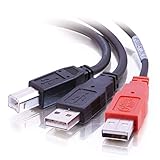
I also tried plugging both plugs into the Pi - that didn't work either. You need a separate powered hub.
Rather than use two plugs, I'm going to try to find a mains plug with two USB sockets. Each socket needs to supply at least 1A. Something like this looks like it should do the trick.
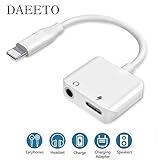
Or, you can use a cable like this.
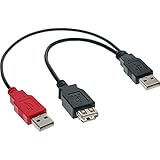
Put one male USB plug into the PI and the other into a power supply. The dongle fits into the female USB socket.
P-p-p-p-pick Up A PPPD
In order to get our network connected, we need to install the ppp package.
sudo apt-get install ppp
If You Think I'm Sakis, And You Want My Body...
I tried using wvdial and numerous other ways to connect to 3G. None of them worked reliably. In the end, I turned to sakis - the All-In-One script for connecting 3G modem.
Sakis says it is:
"The easiest way to have your 3G/UMTS/GRPS connection up and running."
I can't argue with that!
Installation is very simple:
First, download the latest version. The Raspberry Pi runs on an ARM processor, so this is the version we download.
wget "http://www.sakis3g.org/versions/latest/armv4t/sakis3g.gz"
The script is compressed. Unzip it.
gunzip sakis3g.gz
Finally, we want to make the file executable so that we can run it.
chmod +x sakis3g
Running sakis is quite straightforward. It has a basic GUI which will work even if you're just using the command line.
sudo ./sakis3g --interactive

Sakis has a fairly comprehensive list of connection details - it should find yours automatically and present you with this screen.

If it doesn't know your connection settings (if you're on GiffGaff for example) you can manually enter them.
All being well, after a few seconds, you should see this screen.

You can now exit sakis. You will stay connected.
To check the details of your connection, run the following command:
sudo ./sakis3g connect info
You'll get back something like this:
K3565 connected to giffgaff (23410).
Connection Information

Interface: P-t-P (ppp0)

Connected since: 2012-07-13 07:36
Kilobytes received: 2
Kilobytes sent: 2

Network ID: 23410
Operator name: giffgaff
APN: giffgaff.com

Modem: K3565
Modem type: USB
Kernel driver: option
Device: /dev/ttyUSB0

IP Address: 10.136.6.52
Subnet Mask: 255.255.255.255
Peer IP Address: 10.64.64.64
Default route(s): 10.64.64.64
That's it! You can now access the Internet via your 3G modem.
Surfin' Safari
One last tip for you! There's no need to start your window manager to surf the web. There's a brilliant lo-fi web browser called Lynx.
You install it by typing:
sudo apt-get install lynx
You run it by typing:
lynx http://www.bbc.co.uk/news
(or whatever website you want to visit).
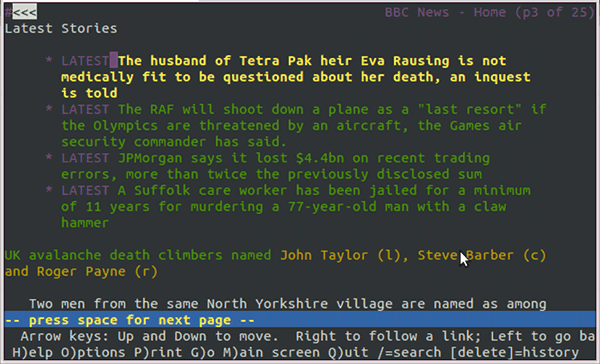
So, that should be everything you need to get the Raspberry Pi connected over a USB 3G dongle. Have fun!


142 thoughts on “3G Internet on Raspberry Pi - Success!”
allaun
If you want to stay a command line commando, you can always use Links2. It supports simple graphics. http://www.aboutlinux.info/2007/02/links2-cross-platform-console-based-web.html Although it may have been depreciated / taken out of the repository by now.
I'll take a look at that - thanks!
juanRIOT
Magnificent! Thank you for this tip. Ever since I ordered my Raspi, Ive been tossing and turning my brain on how I can connect to 3G with it.
Jimbob
Hi there,
I've been reading a lot about Raspi, being a former A-Level computer science student (back in the early/mid 1990s). It's a great idea. But after hearing more on the Guardian tech weekly podcast I got wondering, would is be possible to also create programming simulators for iphone/ipad/android as another simple way to get kids back into the fun of programming? Using some simple gamification to create interest.
SRullo
Hi! I need some help to connect a vodafone usb modem with my raspberry. Are you installed an external library? I'm working with Wheezy and Sakis3g has some issues to connect it.. Thanks!
What issues?
SRullo
Hi, if I try to connect the HUAWEI E220 it works fine but with ZTE K3765-Z sakis3G show me an error "Failed connection"
how do I access this w/o a internet?
richard
hi I am trying to setup my E220 modem. May i know which version OS are you using? I am using ArchLinux. Thanks Rgds Richard
I used Wheezy - the Debian build.
richard
Thanks.. Tried that but it did not work will with webcams. Will get another sd card for wheezy.... thanks
Andrew
Is there a way to share this internet connection with other (Windows) PC's on my LAN?
Stefan
I'd like to know this aswell
novalis
Have a look at this Tutorial, guys:
http://elinux.org/RPI-Wireless-Hotspot
Might work for u....
Ferdinando
Hello,
I've successfully installed sakis and get it worked perfectly. I've also installed no-ip client to get a dynamic IP and it works. I easily connect through lan via ssh and tightvnc but i cannot get access to ssh ot vnc via the 3G connection even if i use the direct IP read from ip addr I've tried also without the lan connection, no-ip resolve the dns as I see it changes after a while, but no connection at all.. any suggestion?
Are you trying to SSH in to your Pi via 3G?
It's likely that your network provider is blocking the ports needed. Try moving your SSH daemon to port 80, or 8080.
Ferdinando
changed to port 80. it's a vodafone sim that works perfectly with the samsung galaxy tab. no access, only via lan. network connection timeout.. i've also tried to change route priority to ppp0, no success.. as the no-ip client sends correctly the ip to their dns servers, the 3G internet connection works.. anyway i've tried to connect directly to the ip shown with ip addr (which is the same that appears after a while issueing a ping to the dns) really strange....
Pranao Walekar
Does the modem has 2g fallback?
Ferdinando
this is the ip addr output regarding the ppp0 interface..
3: ppp0: mtu 1500 qdisc pfifo_fast state UNKNOWN qlen 3 link/ppp inet 37.183.99.123 peer 10.64.64.64/32 scope global ppp0
Ferdinando
ok. I've fixed it. the main issue is that if you connect through a 3G USB dongle you don't have a public IP address but a network one. so you need a reverse connection. to do that, just act that way: suppose you are trying to connect via a windows machine with a fixed ip and with a port forwarding in the router for port 22, with user USER and password psw on raspberry machine, execute this command after the 3G connection: ssh -R yyyy:localhost:22 USER@xxx.xxx.xxx.xxx
where yyyy is a free port, xxx.xxx.xxx.xxx the fixed ip of the windows machine. once connected, authenticate with the windows USER psw. use sshpass -R yyyy:localhost:22 -p 'psw' USER@xxx.xxx.xxx.xxx install sshpass with apt-get install sshpass replace psw with the windows USER password
you can use a ssh server (a free one such bitvise ssh server) running on the windows machine to get the connection.
on the windows machine, using a ssh client issue the command ssh localhost -p yyyy where yyyy is the same port of the raspberry connection. you will get reverse access to the raspberry pi machine connected to the internet through a 3G USB dongle..
that's all. works perfectly.
ahmed wahdan
hi, thank you for your tutorial i will try it soon but can i open other ports for other services?? web access for examble (port 80) i have some other problems with Raspberry pi can you send me your E-mail or facebook account.
Hi, Opening ports depends on your Mobile ISP. You should speak to them. I can't provide support for the Raspberry Pi - you should visit http://www.raspberrypi.org/phpBB3/ Thanks T
sanjay
right now i don't have Internet in my raspberry pi, is it possible to download sakis3g.gz & copy on a Pen-drive & install it on raspberry pi,
Step by Step Instruction will be helpful as i'm totally new to linux.
Thanks & regards, Sanjay
Yes. You can download the file on the usb stick - or directly on to the SD card. Then install it.
Full instructions can be found on the site http://www.sakis3g.org/#binaryfree
pi
how to get raspberry pi to automatically connect to 3g network on every boot up?
I tried to follow this guide http://www.sakis3g.org/versions/latest/guruplug/guruplug.html
but no luck 🙁 it seems that my modem does not get into proper mode first, but if I run sakis3g it switches automaticaly and it connects, however with /etc/udev/rules.d/ files it does not...
Take a look at this Page which will show you how to run commands automatically on startup http://www.stuffaboutcode.com/2012/06/raspberry-pi-run-program-at-start-up.html
Note, you may also need to follow this guide so you don't have to enter your password every time http://wiki.sakis3g.org/wiki/index.php?title=Sakis3G_with_sudo
Marko Novak
Hi Terence!
First of all, thank you for posting these instructions. They helped me setting up the GPRS connection from my raspberry pi tremendously! 🙂
One question though... You mentioned at the beginning of your post that a powered USB hub has to be used. I plugged the Huawei Vodafone modem directly into the USB slot of the RPi (without the powered USB hub) and it works fine. It successfully connects to the internet and I'm able to do all the browsing and stuff.
Since I'm using the latest revision of the RPi (rev 2, the one made in the U.K., bought in september 2012), have you perhaps heard if the USB powering problem has been fixed for that revision? Or is it possible that I'll will be experiencing the random dropping of my GPRS connection?
Hi Marko,
It's possible that the new boards give more power. If you're on 2G (GPRS) that also uses less power, so that might be the reason.
T
Hi Terence
Thanks for the article and heads up. Unfortunately we are getting an error message with our huawei hilink on O2. It basically says, "Failed to connect". Any ideas please? Thanks Rich
Is it plugged into a powered USB hub? Do you have credit on your SIM? Are you allowed to use dongles on your mobile tariff?
Any more specific errors?
Damage
Terence, you really are a life-saver 🙂 I was troubleshooting ZTE MF688 for a week because device was obviously restarting when I made wvdial connection. It's so simple, I just plugged 3G modem into powered USB hub and it worked. Thanks for the advice!
khingcat
Will it work also for EVDO modem? Thanks.
It should do. Try it and tell us 🙂
khingcat
I am actually waiting for my Raspi, I'll try it once it arrived. Thanks.
Mequa
Hi, could this work on Raspbian with Vodafone Mobile Broadband K3770, HSPA USB Stick (Huawei Technologies)? (It's a pay-as-you-go service which I have topped up.)
I have the first revision Pi. I don't yet have a powered hub, trying the above steps with it plugged directly into the Pi, the device showed in the list, but gave "failed to connect" when selected. Is a powered hub all that's needed to fix this?
I haven't tried Raspbian yet. However, if the device is showing in the list it should work once you get a powered hub.
Damage
Powered hub is definitely a preferred solution, Y cable is not - "except" if you plug the red USB connector into another device, to get some extra power. I my case I've tried to plug it in TV (0,5A) and it worked. I have also plugged RPi into TV (1A) and it still worked.
Mequa
Hi, could this work on Raspbian with Vodafone Mobile Broadband K3770, HSPA USB Stick (Huawei Technologies)? (It’s a pay-as-you-go service which I have topped up.)
I have the first revision Pi. I don’t yet have a powered hub, trying the above steps with it plugged directly into the Pi, the device showed in the list, but gave “failed to connect” when selected. Is a powered hub all that’s needed to fix this?
fcastril
Hi, do you know how send SMS to mobile ? I have a project that need to send information to my mobile by SMS while a switch is pressed on. Thanks
Take a look at my other blog post - http://shkspr.mobi/blog/2012/06/raspberry-pi-and-frontline-sms/
Henry
Hi Terence, love the article, great desktop pic! I've been thinking about installing my raspberry pi in the car with 3g. What I would like to be able to do is read information about the strength of tower signals around me with the intent of locating the car. Have you any idea if I can read this information from a stick (don't have one yet, any suggestions would be welcome)? Also saw the other great piece about sending SMS's. All cool stuff!
It depends on the stick but, yes, in general - you can see signal strength.
Richard M
Why not use GPS to locate the car? You can use a USB GPS receiver to locate the car and the 3G dongle to either send you information by smms, email or some other means over the internet
trying to access the sakis3g.org site now since two days but is seems to be down, is there another way to get that file somewhere?
Seems to be back up now.
NiBa
Its down again. Well, is there another way to get that file somewhere?
yes it's back, sorry for the confusion. wish everyone would use code hosting like github for such projects.
Amogh
Hello. I am trying to connect a Pantech UML 290 to my rpi running wheezy I have tried everything but killing myself to get connected. Sakis 3g kept throwing a modem does not have gsm capabilities at me and when I tried - - no probe it gave me a pin error. I have also tried wvdial but it does not work on arm as it should. have also tried ppp chat script but it keeps throwing a connect script error at me Could you please help me?
Is the dongle on a powered hub? Does your SIM have a PIN lock? Does the dongle work in another device - say, a laptop?
Amogh
Well the dongle works fine on my laptop with vza . It is on a powered hub. And in vza I have disabled pin.
Amogh
Any ideas ananyone? I have already tried ppp which gives me connect script failed. I have a project due within a week .please help out folks
Marius
This was a great tutorial! But how can I connect automatically when I reboot my Raspberry pi? Im planning to run my Pie without a monitor...
Best regards Marius
Michael
Hi im trying to connect my ZTE MF665C but every time i select in the option for which device it comes and says failed to connect, i have no idea whats wrong.
i have it connected to a usb powered hub
Some modems show up as a USB drive first (so you can load the drivers on to your Windows machine).
Take a look at USB-Modeswitch to see if that will help.
Peter
Thanks for sharing this. I am interested in doing this with a prepaid SIM card that charges per txt and MB of data. As such, I want to eliminate unwanted background network access-- e.g. even when I am not using my Macbook, there are a lot of small internet accesses that I can snoop using netstat. Is this a problem with the Raspberry Pi? I want to leave the RPi on 24/7 and only plan on sending ~5 SMS messages per month at 10 cents each and am worried that the low level data usage will overwhelm the savings from $10 per 3 mo plan.
Could you possibly run netstat to snoop your internet connection for a while and give me an idea of how much background activity there is?
With the default install, I think the only internet access should be from the update checker - which you can disable. If you only care about SMS, you don't need to use data at all.
Hey. First off, nice post. By far the clearest I've found on the subject. Not having much joy getting 3g going on my pi though. I get 'failed to connect' everytime. I'll list my process- Using Huawei E3231 on 3 (UK) Latest wheezy raspbian (fresh install and updated) Dongle works as expected under windows lsusb = ID12d1:1f01 (is that the issue?) Followed your instructions Get same error everytime
I'm still pretty new to all this so I'm finding it hard to even search for a solution. I'm trying to get my head around usb_modeswitch. Unfortunately, I've not come across any reports of this device working with R-Pi. There must be a solution though(fingers crossed). Any ideas? Cheers
There are some fairly detailed instructions on how to get this working on the Raspberry Pi website http://www.raspberrypi.org/phpBB3/viewtopic.php?t=18996&p=210958
Do make sure you're running on a powered USB hub.
Cheers mate, I'll give it a go. Don't know how I managed to miss that post. Running my pi's and peripherals form a converted PC psu so no problems with power. Nice one for the quick reply.
Hi again. I tried the recommended post. Didn't get far though. Couldn't get the thing to perform a switch. It states you use the command- /usr/bin/sg_raw /dev/sr0 11 06 20 00 00 00 00 00 01 00 to switch with sg3_utils. I get- do_scsi_pt: Bad address. I don't know what the numbers represent in this command but I'm assuming it's that. I've posted a message on the other post(waiting for reply) but I thought I'd try my luck here as well. Cheers
exstud
got the 3G working on arch in I think 10mins with this, THANK YOU!
lepidas blades
first of all i want to say that this project is really useful BUT i got no joy connecting my huawei e1750 over 3g. when i start sakis it asks what to do and i say connect to 3G but the response is Embedded Usb-ModeSwitch binary is not valid for your architect. You need to recompile for devices to switch properly: ./sakis3g recompile.
I am possitive I downloaded the link you gave, also i use raspbian.
if any advice thank you very much
As the message says, you may need to recompile it. The guide is on the wiki http://wiki.sakis3g.org/wiki/index.php?title=Sakis3G_compilation
FD
I just managed to do it on Arch linux with the 3G USB dongle. Check it here: http://www.facebook.com/photo.php?fbid=10151174131440974&set=o.363813467010036&type=1&relevant_count=1&ref=nf
Cool! Have you written it up anywhere?
Nick B
Worked for me, using a Huawei E169 on 3UK.
I'm curious to know what speeds people are getting? I ran a quick speed test which showed 1MBps but that could be down to network congestion/weak signal.
I'm using a later Pi and mine works without a powered hub. The second USB slot is used for the keyboard/mouse via a PS/2-USB adaptor.
hello http://www.sakis3g.org is not online from more of a week 🙁 can you post thise file ? thanks
lauhub
Hello, Yes, sakis3g.org is down for now. Is there a way to contact them ? Or to get the files anywhere else ?
I found an alternate source for Sakis3G utility here: http://www.draisberghof.de/usb_modeswitch/bb/viewtopic.php?t=904 I did not test it cause I cannot for now, but if anyone can, feedback is welcome
GekkePrutser
http://www.sakis3g.org is actually back now! Great, was looking for it myself too.
exstud
Is it possible to send sms while keeping the 3G internet connection open or do I have to close it?
exstud
It did work simultaneously... my 3g router (huawei) was listed as 3 lsusb devices, the lsusb2 accepts AT commands...
Tony
Will this automatically reconnecting when/if the connection is lost, or would I need to manually reconnect by running the sakis3g script again?
You will have to run a script to check if it is connected and then reconnect if not.
Is there anyways to automate this? I find if I leave the connection open too long I have to reconnect, I would like it to maybe try and reconnect on its own if the connection is lost.
Hi Terence,
What are your thoughts with tethering an android phone via usb and using it as a modem for the pi?? Will the same steps you described above apply??? I have a Motorola phone running gingerbread and I want to send trigger commands to the pi. I have a few specific questions and I'm not sure where to start. Any help would be greatly appreciated.
Best Regards, Mark C.
Hi Mark,
There are two things you need to know first. 1) Does your phone support tethering via USB? (There should be an option in the settings menu) 2) Does your carrier allow tethering? (Some don't, or will charge you extra for it)
If the answer to both questions is "Yes" then it should work just fine.
There are a couple of good looking tutorials at http://www.linuxstall.com/android-tethering-using-android-to-access-internet-on-your-linux-machine/ http://blog.ecafechat.com/android-usb-tethering-ubuntu-12-04/
Good luck and let us know how you get on!
Terence
Zoltan M.
Hi Terence,
first of all, a great howto - thanks a lot! My project would be: to open my garage by a simple phone call, using a pi and a usb modem. Do you perhaps know what I need to doe here? Receiving calls and checking IDs is simply done by AT commands? How can I tell if a call is about to happen, I mean how to recognize if a ring the modem? Do I have to poll something constantly, or is there a trigger somewhere when the modem rings?
Thanks a lot in advance! Regards, Zoltan
First of all, you will need to find a USB dongle which will accept voice calls - many won't. You'll also need a SIM which your network provider has enabled for voice.
Zoltan M.
The SIM I do have, and also a few dongles - do you perhaps know how to check if they have the feature? Or could you perhaps recommend a few specific modells?
Zoltan M.
So, checked my Huawei 1750 with DC-unlocker, it is voice enabled. Any Ideas where/how to start? 🙂
exstud
for that project you could simply get a cheap $20 phone and use the speaker signal to control your garage
Zoltan M.
Yeah, thought of that, but it won't be that elegant and customizable that I would prefer. And hey, where is the fun and the joy of discovery in that? 😉
Neil
Well, it's over a year later, but, just for the fun of it: it's pretty straightforward to turn a Pi into a GSM gateway, capable of receiving calls (as an inbound route into Asterisk) and handling text messages.
I installed RasPBX (a Debian based Asterisk / FreePBX distribution), and configured the chan_dongle package.
Brilliant! You should definitely write it up. Which dongle did you use?
Michal
Will ZTE MF669 work as well?
Nice write up. Thanks for sharing. An easier way to get started with 3G and RPi is using a TP-LINK TL-MR3040. Plug the 3G modem into the TP-Link's USB and the RPi and the TP-Link's with an Ethernet cable and you're good to go.
http://www.tp-link.com/en/products/details/?model=TL-MR3040
If the http://www.sakis3g.org is down, pls get it by using this:
wget "http://sourceforge.net/projects/vim-n4n0/files/sakis3g.tar.gz"
Giuseppe
good mornig, first of all thanks for the tutorial. I started sakis3g but i am not able toi connect to internet
in the command line I show "Fixing connection "
I have a Olivetti Olicard 100
thanks Giuseppe
Have you tried running usb_modeswitch ?
Giuseppe
the only command i did was lsusb
Bus 001 Device 006: ID 0b3c:c000 Olivetti Techcenter Olicard 100
I don't know how to use usb_modeswitch
Giuseppe
i have found this post useful in finding out a way to create a automatic method to connect the pi to a 3g internet via sakis3g script. the details are posted in http://lawrencematthew.wordpress.com/2013/08/07/connect-raspberry-pi-to-a-3g-network-automatically-during-its-boot/
Cyan
Wont work with EVDO, those are CDMA not GSM. Sakis only supports GSM.
RobotZombie (@NecBalaam)
Hi i have another version to install 3G Modem with Raspberry Pi, it is in Spanish but could help to some who wants to use Google Translate, also if you don't want to use Google Translate it could be easy 'cause it has images to guide... http://www.webonactivo.blogspot.mx/2013/09/raspberry-pi-con-banda-ancha.html
Dario Cillerai
Hello Terence, do you think the following can work?
Thanks
Try it and find out 🙂 In general, a hub shouldn't feed back power, and male-male cables shouldn't be used. But it could work.
Dario Cillerai
OK, thanks. I prefer not to risk and I've just ordered the Y cable you have advised! Also Raspberry Pi arriving next week, I hope. I'll let you know how it ends.
Dario Cillerai
Hello, I've eventually received a Raspberry Pi. I've successfully installed SAKIS3G and got access to Internet using a Huawei E1692 Internet Key. External USB hub is not necessary for the Internet key to work, but if any USB dongle is inserted in the PI when already powered, the Pi restarts. Any USB device has to be attached before powering the PI. Everything is OK if an external USB hub is used to provide additional power.
Bye!
Gnichi M
Hi, very good work and i want to thank you for it. I have a question : can i use this to connect only to GPRS with 3G usb modems? Thanks!
It will depend on the modem you have. The easiest way is to ask your ISP to disable 3G on the SIM. If that doesn't work, take a look at these AT Commands http://m2m.com/thread/2091
Jochen
I want to use a Huawei E122 modem with my Pi (Raspbian), but I specifically don't want a WiFi hotspot. My aim is for the Pi to connect to 3G and share that connection out via LAN, this goes into a hub, which will provide LAN and WLAN access for all other devices in the house. Can this be done?
Yes, very easy to do. This is how to do in in Ubuntu, for example. Make sure you check how much data you're using - you don't want to get stung with a big bill to pay!
Hi Terence, I am following your blog reg sakis3g. here in india I have tata photon+ CDMA dongle. when I use sakis on it , it says "Device did not report GSM capabilities. You can skip this by adding --noprobe command line switch. " what do I need to do??
You need to follow the instructions it gave you, or buy a GSM dongle.
stakhanov
I use a Huawei E303 in a Raspberry Pi Model B (not sure if its the newer or older revision, but I bought it in September 2013). First I struggled quite a bit, since it worked reliably when hotplugged but not at boot-time. Then I found the post in this thread http://www.raspberrypi.org/phpBB3/viewtopic.php?t=32307&p=439933 about creating /etc/udev/rules.d/41-usb_modeswitch.rules which fixed the problem.
Now, everything is fine at boot-time and/or when hotplugged, but when I leave the Pi running then after anything between a few hours and 3 or 4 days, the interface just seems to vanish.
I thought it might be to do with power so, as suggested, I plugged the dongle into a powered USB hub, rather than the Pi directly. But it's still not solving the issue. Do you have any pointers for me on that? Any help would be much appreciated!
kyle
Hey I'm using a sierra wireless 320u aircard and I'm having trouble getting the internet to work on my raspberry pi. If anyone has been able to connect one or knows any ways could please comment on how you achieved this.
Bill
Any chance someone from the US has gotten a3G dongle to work?
Sam
Guys, I'm hoping you can assist. I have loaded the Sakis3g software onto the pi according to the procedure above. When I run the command "sudo ./sakis3g --interactive", the Sakis GUI does not load. I just get a listing of the various options available, as if I called up the help file for the Sakis script. Any idea why this is happening.
Too many comments to read but have you considered a good powered Hub (Belkin are good) and power the Pi from the Hub and simultaneously use the Hub as a Pi expander?
JoeBob
What happened to sakis? It's gone?
The site does appear to be down. I think the official download is at http://sourceforge.net/projects/vim-n4n0/files/sakis3g.tar.gz/download
You can also find a clone on GitHub https://github.com/Trixarian/sakis3g-source
xavier
hello dear sir,
I just installed a fresh raspberry pi model B with a zte usb key and i got the following message : embedded usb-modeswitch is not valid for your architect. You need to recompile for devices to switch properly. start by issueing ./sakis3g recompile Thats what i did but it didnt work. it tells me that a library, usb.h and a developpement kit libusb are missing. What can i do and were can i get that ?
First, thanks for the post and to all who have contributed since!
Adding... I had numerous problems getting sakis3g just right on my Pi, from crickets at sakis3g.org to compliation problems. This post (http://insembedded.wordpress.com/2014/03/27/setup-3g-on-raspberry-pi-using-sakis3g/) fixed all that.
But then I kept getting connection failures from within sakis3g. So, I scrolled back to the top and started over with a powered USB hub, rather than directly connecting my dongle to the Pi. That worked! Never underestimate the power of power. 🙂
But... introducing the hub sort of shot my mobile project in the foot. I was trying to use a relatively old AT&T USBConnect Quicksilver device that works great on my laptop. But I suspect that it something of a glutton. So, I'm wondering if anyone has found a "low-power" 3G/4G dongle that works off of Pi power?
clementine
Hi Fred, did you find the low-power dongle you were looking for? I'm currently looking for the same thing. Also did you try boosting the pi's usb current for your old dongle? http://www.modmypi.com/blog/boost-usb-current
Sorath Asnani
Hello! I have to send MMS via Raspberry Pi. Any suggestions which GSM modem or 3G dongle could be used for sending MMS? Is 3G dongle able to send MMS? Any help is appreciated. Thanks.
Sufi
Hi Terence,
I am trying to use E173 Huawei on my raspberry but its just ont creating the ttyUSB1 and ttyUSB2 I spent few days surfing internet for similar problem, and I ended up doing everything without result I belive my dongle is detected as a mass storage, and I tried commneds swtiching failed, please let me know if if there is straight forward stetp to : change the dongle from Cd rom to modem.
thanks sufi
Pretty fail-safe would be to burn a Linux live DVD, and use that to do the modeswitch thing. I used one of my dongles on a Linux box before Raspberry, and it worked fine...
Sufi
Hi , thanks for suggesting to use the dongle on a full installed Linux , but how am info that on raspberry PI. My aim is to use the dongle on the RS PI. And not another Linux box
Yeah, didn't make it clear. Use the Linux live DVD for only a few minutes while it mode-switches the dongle. Then, pop the Dongle on the Pi! Also look at UMTSkeeper....pretty well does everything GSM, on the Pi. I used it - worked fine! http://mintakaconciencia.net/squares/umtskeeper/
Sufi
Hi Andy,
I used the dongle on fully installed linux on a nother machine, the dongle comes successfully as modem. but when I take it back to the Asteriaknow box, it is just isisting come as CD rom. please help;l
Did you try USB-modeswitch manually on the Linux box? I think UMTSkeeper has good instructions - from memory (My UMTS PI isn't in use at the momennt) it may exen do the work for you. Do checck out the link I gave. Let me know.
Hi Again, I bought another e169 huawei modem as the e173 gave me nightmares with no result. the e169 is detected fine as a modem. the raspbx is picking i successfully but its not picking in bouchd calls, any help is appreciated.
I ve created trunk created route created sip
configured properly, but its not picking the call.
Hi,
could you please let me know the steps to enable voice for Huawei E 169 under linux command line, I ve seen AT commands on the web but when I run in the connand line it says not found.
Sufi
Hi guys
I have managed to use the 3G huawi 169 modem on raspbx. It's detected successfully as modem. But freepbx is failing to register the trunk. I used custom option I used Trunk configuration options. But no success. Any clue ?
atat
hi sufi,
is your usb modem installed properly? i suppouse that it is found in 'lsusb'. ssh to your rasberry. type ls /dev/ttyUSB* is there anything (like ttyUSB0 or ttyUSB1 or so)? if it is not, did you modprobe it? for your dongle command should be modprobe usbserial vendor=0x0af0 product=0x5000 if you have not installed modprobe, just 'apt-get install' it. if it is all ok and ttyUSB is located in /dev, is dongle properly set in nano /etc/asterisk/dongle.conf near the bottom of dongle.conf find paragraph [dongle0] uncomment and set path for audio and data (audio=/dev/ttyUSB0 say..). if you are not sure for ttyUSB device, leave audio and data commented and uncomment and enter imei and/or imsi numbers. at least imei you will find printed somewhere on your dongle. after restart all, log in to asterisk cli asterisk -rvvvv from cli type dongle show devices your dongle should be listed. if it is not, check again all settings. maybe your dongle is locked... google 'unlock 3g dongle'. if dongle is listed, 'exit' from cli and check settings in raspbx gui.
Hi i'm using dlink dwp 156 3g dongle could you please help me to get it connect to Raspberry pi with raspbian OS
Which 3g dongle did you use ? can we connect dlink dwp 156 3g dongle to Rpi running raspbian os ? what other list of 3g dongles support to rpi with sakis3g.com
Googly
You managed to get it working?if so please provide me the steps
gazaeyesight
Nice post... I'm using Huawei E1750 usb modem and it works perfectly! Thank you
oldnick
Hello,
I want to know if it is possible to use voice and data (3G internet) at the same time. I have already use raspbx with voice incoming.
Please advice
Terence Eden
That will depend on your device and whether your network supports it.
oldnick
My usb dongle is huawei E169 and my cell provider support voice/data at the same time.
Terence Eden
Try it and let us know what happens.
clementine
Hi Terence and guests
Thanks for this blog post and for maintaining an active discussion forum on this topic.
I'm trying to establish which is the best 3G dongle for my pi project. My criteria are : 1) low power consumption, 2) cost
My pi is battery powered, and I would like to use a 3G dongle I can plug directly into the pi's usb port.
Has anyone tried to boost the USB current in the pi and succeeded in plugging a 3g usb dongle directly (cf: http://www.modmypi.com/blog/boost-usb-current)?
Any suggestions welcome!
Clementine
Trackbacks, Pingbacks, and Boosts
[…] site I found the answer to the 3G problem was Terence Eden’s Blog. Here’s a shortened version of the solution – copy and paste the following text into […]
[…] should be able to navigate the setup.. but if you’re finding it hard have a look HERE or […]
[...] http://shkspr.mobi/blog/2012/07/3g-internet-on-raspberry-pi-success/ [...]
[...] A 3G USB dongle – won’t work on Raspberry Pi A according to this post [...]
[...] (ours will be bit different from the ones given over at 3G Internet on Raspberry Pi – Success!, also order of executing the instructions is [...]
[...] Also, there are some 3G dongles that do not need an external power source to be connected to the Pi. Use Sakis3G on your Raspberry Pi. [...]
[...] ネット見てたらこっちのブログで、給電できるUSBハブ使えよ、って書いてあった! [...]