How do you know where this link goes to? If you're on a desktop, you might notice that hovering your mouse over it displays the destination somewhere on your screen. If you're a geek, you could view the source-code of a page. Can we improve the experience for users? Here's an attempt. Try hovering your cursor over this link to a popular website. This is what it should look like: Here's how …
Continue reading →

A fun little CSS experiment! There's a new(ish) feature in CSS which allows you to set the way text is wrapped. Ordinarily, a long line of text might be split at an inopportune time. For example: This very long headline ends with a single word Having a dangling word doesn't always look great. Using text-wrap:balance would give us something like: This very long headline ends with balanced…
Continue reading →
Suppose you have lots of links on a page. You want to highlight the ones which point to example.com - is that possible in CSS without using JavaScript? Yes! This scrap of code will turn all those links red: a[href^="https://example.com"] { color: red; } Now, there are a few gotchas with this code. It matches the string exactly. So https://example.com will not match…
Continue reading →
I am a bear of very little brains sometimes. I had a site which, for various boring reasons, was printing a <style> element in the middle of the HTML's body. Because <style> is a metadata element, it should only appear within the <head> element. This is OK: <!doctype html> <html> <head> <style> a { color: #f00; } </style> </head> <body> … This is an error: <!doctype h…
Continue reading →

I want to make emoji bigger than the text that surrounds them. At my age and eyesight, it can be difficult to tell the difference between 😃, 😄, and 😊 when they are as small as the text. Is there a way to use CSS to increase the font size of specific characters without having to wrap them in an extra <span> or similar? Yes! Although it is a bit of a hack. This relies on 3 CSS features: src: lo…
Continue reading →
Do you know about the EURion constellation? It is a pattern which is embedded into some modern banknotes and has a curious property. Most modern photocopiers will, if they detect the pattern, refuse to make a copy. Try it for yourself - stick a €20 note into your nearest Xerox machine and try to print out some illicit currency - see what happens! It goes a little further Some printers will r…
Continue reading →

How do you know you're looking at an old website? You may have found a page which has lots of interesting information, but how can you tell it's a modern and relevant result? Some websites don't contain dates in their URls. There may not be a © date or publication date shown on the page. And the <meta> tags might not contain anything useful. If you're lucky, the site will look old fashioned: …
Continue reading →

Yesterday I wrote about a lazy way to implement a manual dark mode chooser. Today I'll show you a slightly more sensible way to do it. It just uses CSS, no need for JavaScript. Here's a scrap of HTML which present a dropdown for a user to choose their colour scheme: <select id="colour-mode"> <option value="">Theme Selector</option> <option value="dark">Dark Mode</option> <option…
Continue reading →
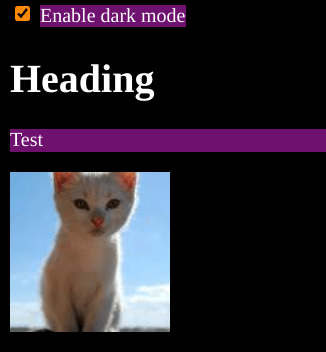
I'm not saying this is a good way to make a dark mode website. I'm not even saying it's a sensible way to do dark mode. But I'm pretty sure this is the laziest way of getting dark mode on your site. And it is all done with less than a handful of CSS rules. It relies on the new-ish :has() CSS pseudo class and the positively ancient filter() CSS function. Here's the code in all its glory: …
Continue reading →

Sometimes you learn the most from failures! I wanted a <select multiple> element where the <options> were laid out in a grid. I nearly got there. It's possible to have the <option>s in a horizontal row - but only on Chrome and Firefox. Here's a quick fiddle showing the results: As you can see, it's possible to do some pretty extravagant styling of the individual <options> you can even…
Continue reading →
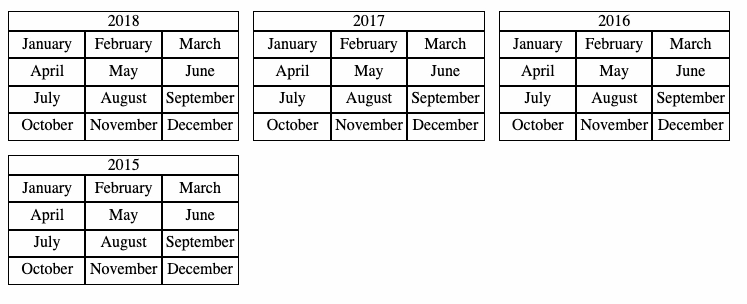
This blog has a calendar showing my yearly archives. It was in a table layout - which made sense when I first designed it - but had a few spacing niggles and was hard to make responsive. Now, it behaves like this: The code is relatively straightforward. The HTML for the calendar looks like this: <div class="calendars"> <div class="calendar"> <div class="calendar-year">2018</div> …
Continue reading →

Every day is a school day. I'd recently seen a post about highlighting images without alt text. That got me thinking. Is it possible to style alt text? Yes. Yes it is. And it's pretty simple. Well, OK, it's CSS, so simple is a relative term! Let's take a broken image like <img src="http://example.com/bigfoot.jpg" alt="The best quality photo of bigfoot!" /> There are two slightly different…
Continue reading →