

When I ran Ethernet around our house, I thought I was being clever. A CAT6 cable for every room - lush! Some of my rooms have lots of devices, so they get a nice big Ethernet switch with lots of ports and blinking lights.
But most of my rooms don't have that many devices. Our gym had only an Internet connected TV so that I could watch Quibi while exercising. Recently we added a Kodi box so that I could stream Linux ISOs while sweating on my static bike. Was it worth running another cable there? No. Did I want to buy an expensive hub or switch with multiple ports? Also no.
Enter the EH210. I bought it because it is USB-C powered - as everything should be.
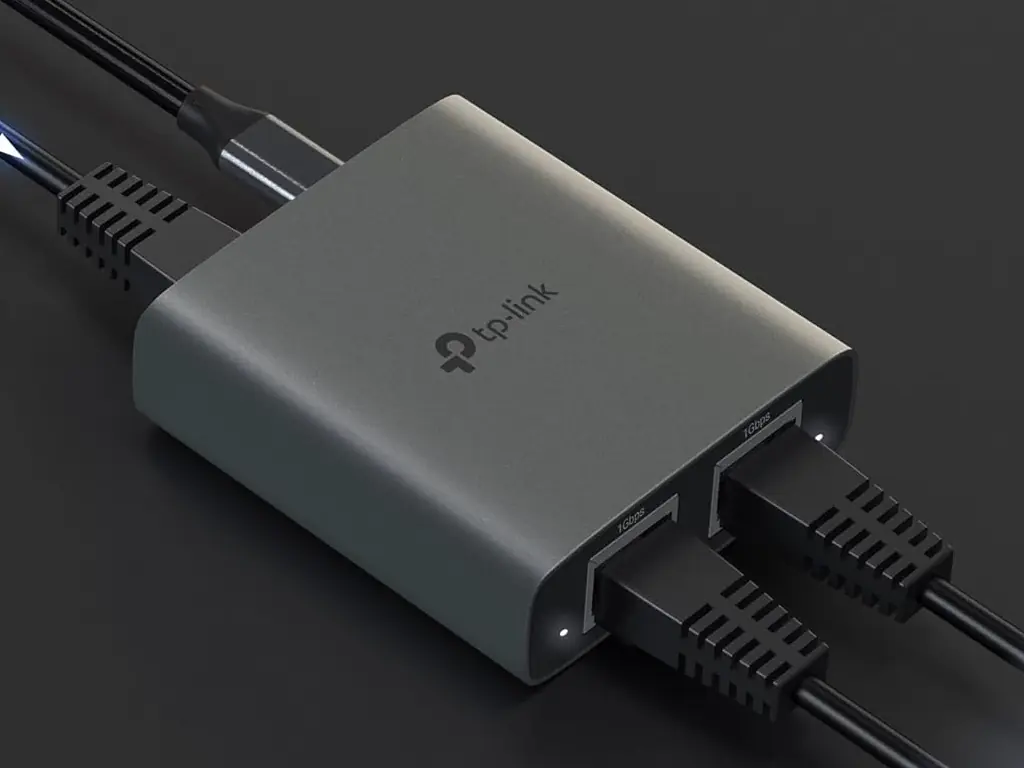
The USB cable it came with was reasonably long. I shoved the A end into the TV and the C end into the device. When the TV is off, it doesn't supply any power to its USB ports - which is perfect for me. When the TV is on, the splitter wakes up quickly and starts blinking its little lights.
The metal chassis is good at dissipating the heat. The lights aren't egregiously bright. Both outbound Ethernet work simultaneously and they are fast enough for video streaming. The supplied Ethernet cable seemed fine.
And… That's all there is to say about it really. For a tenner (depending on The Algorithm) it's a decent bit of kit. If you dont need a fully provisioned switch integrated with your mesh network, this is just the ticket.


16 thoughts on “Gadget Review: TP Link EH210 Ethernet Splitter (USB-C)”
@Edent That’s really interesting, thanks for sharing.
Do you happen to know what sort of power it draws? I assume if you’re powering it from your TV’s USB-A port it must just be 5v at a low amperage? If I could combine that with a small PoE splitter, it could get me out of a jam or two.
I, similarly, don’t want to run any more underfloor cables if I can at all avoid it.
| Reply to original comment on mikecoats.social
@Edent interesting little gadget, I wonder how it works? Traditional ethernet splitters (evil things) work by only giving 2 of the 4 twisted pairs to each connected device. You still need two switch ports, but only use one cable to the user location, with a splitter at each end.
If that's a single device, and somehow connecting the end devices at 1GbE, it's either acting as a mini switch, or lying to the connected devices about the GbE connection (you obviously won't get 2Gb/s).
| Reply to original comment on cyberplace.social
splitter? So is this a hub or something?
| Reply to original comment on bsky.app
Idk I think I’d just pay less for an “expensive switch” and get three extra ports and a power supply…
| Reply to original comment on bsky.app
Yup. A very tiny hub.
| Reply to original comment on bsky.app
Fair.
| Reply to original comment on bsky.app
@WiteWulf @Edent I was trying to understand this. The website says "Any port can be used as the input." so it has to be a tiny switch right?
| Reply to original comment on phpc.social
@willpower232 @Edent yeah, it's got to be. Coupled with the requirement for a USB-C power supply and "heat dissipation" it must have some sort of active components in there.
I'd guess that, whatever it does, it doesn't do it well enough to market it as an actual switch, and that "splitter" is easily understandable from a marketing perspective.
| Reply to original comment on cyberplace.social
@mike no idea. I can't imagine my TV goes above 2A. Buy it and find out 😄
| Reply to original comment on mastodon.social
What does "Ethernet Splitter" even mean?
Is it a proper Ethernet hub or switch?
Or is it just one of those things which uses 2 of the 4 pairs for each connection?(in which case, why does it need power at all?)
| Reply to original comment on bsky.app
@Edent Neat, I might have to get one of those. I wonder if anyone does a PoE powered one, will have to do a bit of digging.
| Reply to original comment on hachyderm.io
Well, there is a TP-Link 5-port ethernet switch that costs €10. It doesn't have USB-C, though; it's a normal barrel jack plug. So, for any room that needs from 3 to 4 devices, this 5-port switch can be a better option for the same price.
Anything which needs a proprietary adaptor is useless to me. I'm happy to pay more and get fewer ports if it means I don't need to figure out which electrical plug something requires.
tbh a barrel jack isn't that proprietary as long as it's not some weird voltage
Except there are dozens of standards for the size and shape of them. Along with multiple power specifications. If it breaks, I need to buy another one with those exact requirements rather than just use one of my spare USB cables.
This is a USB-C maximalist blog.
@Edent Edimax used to do cheap 5 port and 8 port gigabit switches that could be powered by USB, and I have a couple which, courtesy of the upstream switch and a POE-to-USB splitter, are thus unpowered and very handy behind the TV or under the desk etc
https://www.edimax.com/edimax/merchandise/merchandise_detail/data/edimax/global/home_switches_gigabit_ethernet_desktop/es-5500g_v3/
https://www.edimax.com/edimax/merchandise/merchandise_detail/data/edimax/global/home_switches_gigabit_ethernet_desktop/es-5800g_v4/
EDIMAX - Switches - Gigabit Ethernet - 5-Port Gigabit Desktop Switch
| Reply to original comment on mas.to
More comments on Mastodon.