We're getting a few more museums lined up with QRpedia - and busy working on new features. I just wanted to update you on some interesting developments.
QRpedia was presented by Roger at Wikimania - it seemed to go down a storm!
Cock says there can be benefits in relation to the use of QR (quick response) code technology, when a QR reader on a mobile device links to a QR code on a label by an object in a gallery or museum.
"Not only does the link take you to the Wikipedia page for that object, but it also reads which language your phone is set at and takes you to the correct language version," he explains.
QR technology has been tested in museums, including the Derby Museum, but he says the British Museum would not pursue its use unless the code directed the user to the museum's own web pages.
A few more top-secret events in the pipeline - watch this space!
I was invited there to talk about QRpedia and how it can improve visitor engagement in GLAM - Galleries Libraries Archives Museums.
After the introductions, I had a quick wander around the museum - where I found the first set of QRpedia codes! I was, as this video will attest, very excited!
I'll place the slides and video of the talk on the web once they're ready. In the meantime, here's what I learned from the day.
Lessons Learned
Not everything went perfectly with our first public trial - that's to be expected. So here are the top tips that we discovered from the day
Too tall
I couldn't help but laugh as a young boy struggled to scan the code right at the top of this exhibit.
While watching him jump up and down was hilarious - there's a serious point about accessibility. Not everyone can reach as high as the code was placed - especially wheelchair users. It might be worth having some guidelines around code placement.
Too small
Some of the codes were printed quite small. My original intention was to have postcard sized QR codes - large enough to easily see and for several people to scan at once.
What I hadn't figured on was the lack of space in the exhibits and the sheer number of codes that would be there. Here's a snap from one of the display cases, I've highlighted the codes.
They were just about scanable - but I still think printing them larger will make it easier to scan. It's especially important if the code is behind glass and visitors can't get close to them.
Too Much Glare
With the light from the exhibits, the laminate on the QR codes, and the glass cases, there was a lot of glare. Luckily the QR codes were all scanable thanks to the error-correction built in. I think it's probably best not to laminate the codes - keep them as matt as possible.
Unexpected Usage
One thing I hadn't counted on was the creative uses to which the codes can be put. For example, one of the most famous paintings in Derby Museum was on loan. Rather than just put up a regular sign, they'd put up a QRpedia code so that visitors could still see the painting and read all about its history. Brilliant!
Whenever you create a project, don't be surprised if people put it to a use that you had never envisioned.
Code Design
As well as the technical aspects of code design - making them large enough and with sufficient border space - there are some practical considerations.
Without any human-readable identification, it's hard for museum staff to place the codes accurately! A big pile of QR codes are easy to mix up - and finding which code goes with which exhibit can be tricky.
Too wobbly
Rather embarrassingly, I tried to demonstrate how easy it is to scan in QR codes using a code printed on a free-standing poster. The breeze in the room was sufficient to cause the poster to billow back-and-forth meaning my camera couldn't focus on it. QRpedia codes must be afixed to something solid for best results.
The Language Issue
What do you do if an article isn't available in the visitor's preferred language?
My initial suggestion was not met with universal acclaim.
Hey, it's not my fault they don't teach Latin any more!
The suggestions which came out of the discussion were...
Default to the article in the language of the museum.
Redirect the visitor to the Mobile Wikipedia homepage in their preferred language - then they can search for something similar.
QRpedia should look through the article and try to find something similar in the visitor's language.
Present a screen showing all the available languages for that article. Let the user choose which language to read. This is what QRpedia does currently.
There are no easy answers - I guess we'll have to do some trials to see what people prefer. Any suggestions welcomed!
IE6
Bane of web developers everywhere. The accursed IE6 is still in use in museums who can't afford to upgrade their computers. QRpedia.org only works in modern browsers. So we're going to have to do some redesigning to make sure that everyone can use the service.
...And Finally
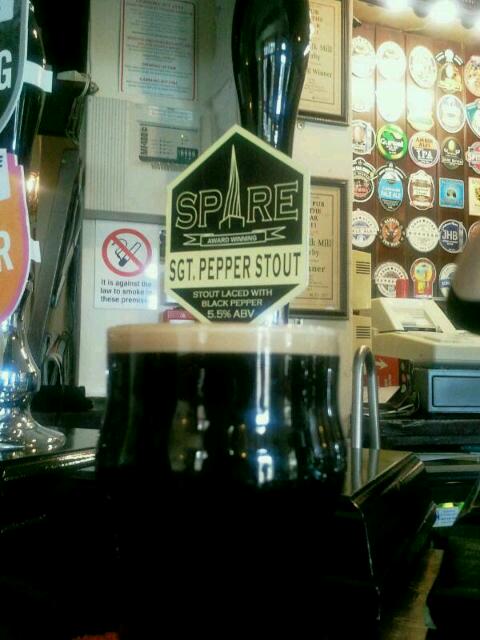
After an amazing day, we retired to the The Old Silk Mill pub. There, I found my new favourite stout - Spire's Sgt Pepper. Made with ground black pepper. it provided the perfect end to a perfect day.
Thanks to everyone who made the day such a success - especially the gloriously bearded Andy Mabbett, the hugely entertaining Richard Mackney, Wikimedia's Andrew Turvey for his kind offer of help, the knowledgeable Hannah Fox, Nick Moyes for all his hard work during the day, the BBC's Mark Ansell for interviewing me about QRpedia, Marrianne Bamkin for pointing me back towards the station, and - of course - Roger Bamkin without whom none of this would have happened.
A special thank you to all the staff and volunteers at Derby Museum for making us feel so welcome - and for allowing us to pepper their exhibits with our QR codes.
There are five key points to the success of such a scheme.
100% of visitors will be scanning these codes on their mobile phones. The code must point to the mobile version of Wikipedia.
<100% of visitors will speak the language of the country where the museum is located (for example, 25% of visitors to the Science Museum are foreign. Pointing to just the English article is unacceptable.
The QR code should be simple enough to scan quickly. This mean using as short a URL as possible.
The URL presented must be human readable. The user must know to where they are being directed. The QR scanner may have a "history" option which will allow the user to see the codes they've scanned.
Statistics must be gathered showing how many people are using the QR codes to assess their effectiveness.
Mobile Redirection is Broken on Wikipedia
The current way that Wikipedia does mobile redirection is broken and should be considered harmful to users.
At the moment, a mobile user-agent visiting http://en.wikipedia.org/wiki/Rossetta_Stone has to load the entire HTML document, process the complex JavaScript, and only then is redirected to the mobile version of the site.
This means that a visitor incurs a significant wait before they are directed to the correct content. If the visitor is roaming in a foreign country, they may pay significant per-MB costs for this download.
The correct way is for Wikipedia's servers to detect the mobile user-agent and 302 redirect to the mobile version.
Language Detection
I don't know how Wikipedia detects the preferred language of its visitors. Ideally, it should look at the Accept-Language Header of the phone and / or use the IP address of the device (assuming the user isn't using the museum's WiFi).
Finally, the QR/mobile version of Wikipedia should allow a user to easily change the language of the page they are viewing.
Short URL, Human Readability, and Statistics
URL shortening services often produce a jumble of letters and number which, while short, mean nothing to the human user. For example http://bit.ly/fNXn1W. In addition, use of commercial URL shortening services is problematic should the company no longer maintain its service.
Using the "normal" URL gives us this
Using the "mobile" URL gives us this
Using a QR code specifically for QR use gives us this
Finally, there could be a separate short domain for Wikipedia accessed through QR codes.
For example, the currently unregistered qrpedia.org
Obviously, this has branding problems - would people recognise it as being from Wikipedia?
Conclusion
Ideally, we would use a URL like http://wikipedia.org/qr/Rossetta_Stone
When the use scanned the code and requested the URL, Wikipedia would then perform two actions
Detect the user's preferred language.
302 redirect to the mobile version.
If the language detection was incorrect, the user could simply change it.
Wikipedia admins, museum staff, and anyone else, would be able to see which exhibits had the most scans.