I have no idea what I was doing on the 28th of November 2007 but, apparently, that's when I first logged in to Wikipedia. Which means, as of right now, my Wikipedia account is 18 years old! I didn't make my first edit until April 2009. That was for the nascent Ada Lovelace Day. Since then, I've racked up a bit over 600 edits which simultaneously feels like a lot and barely anything. Every…
Continue reading →

While spelunking through the caverns of Wikipedia, I came across a biography which contained this curious claim: She was the youngest and first woman to receive a British House of Commons Shield. That sounds like a fantastic achievement! But, and I hate to bring fact-checking to an argument, what is it? Looking around the web, I could only find three mentions of this no-doubt prestigious…
Continue reading →

The "Baader-Meinhof phenomenon" is that weird experience where you learn of a new word or phrase and then suddenly see it crop up everywhere. At the time of writing, the Wikipedia entry for "frequency illusion" said: The name "Baader-Meinhof phenomenon" was coined in 1994 by an online message board user, who, after mentioning the name of the German terrorist group Baader-Meinhof once, kept…
Continue reading →
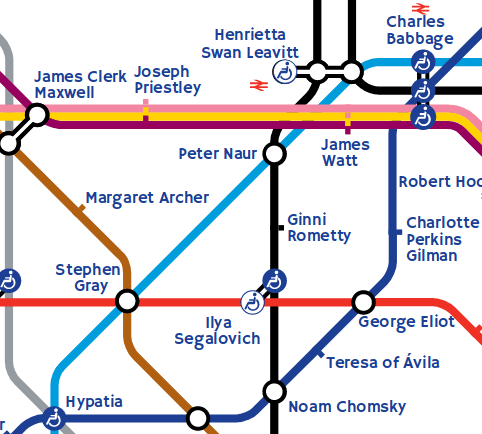
One of my favourite works of art is The Great Bear by Simon Patterson. At first glance, it appears to be a normal London Tube map. But look closer... Cool! But there is something about it which has always bothered me. Each Tube line represents a theme - therefore, a station at the intersection of multiple lines should be represented by someone who matches all of those themes. For example,…
Continue reading →

I few days ago, I was somewhat surprised to find that one of my Tweets had been used as a citation in Wikipedia! I began to wonder - how often are Tweets used in citations? It's possible to search for your own Tweets using this (somewhat obscure) link: https://en.wikipedia.org/w/index.php?title=Special%3ALinkSearch&target=twitter.com%2Fedent Just edit the end of it to see if you, or your…
Continue reading →

What do famous people sound like? The Wikipedia Voice Introduction Project seeks to find out. 🔊 Wikipedia VIP🎤 Terence Eden 💾 Download this audio file. Learn more on Andy Mabbett's blog or follow #WikiVIP on Twitter. Get About A Minute as soon as each episode goes live. Stick this Podcast Feed into your podcatcher Or you can Subscribe on iTunes Intro music "Gran Vals" performe…
Continue reading →

The QRpedia project I helped found has gone from strength to strength. It's now in more museums, towns, and art galleries than ever before. It's helping open up exhibits to people in hundreds of languages. That said, I've not been able to devote as much time as I would like to - nor have other project members. We'd like to see it blossom and grow but, sadly, our resources are too limited to be …
Continue reading →

Beautiful video about the work Derby Museum has been doing with Wikipedia & QRpedia. Derby Museum using multilingual QR codes from Andrew James Sykes on Vimeo. In 2011 Wikipedians wrote and translated 1200 new articles to allow the museums objects to read in over a dozen languages using QRpedia codes. …
Continue reading →
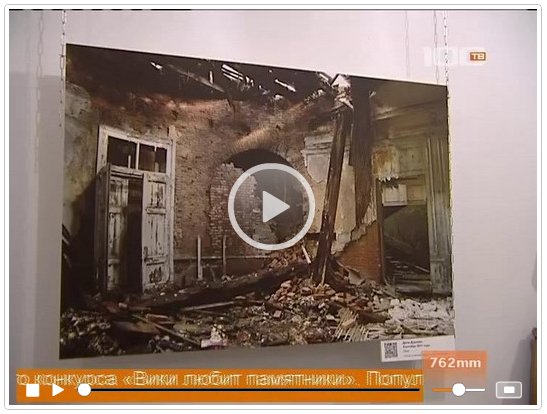
The "Wiki Loves Monuments" project in Russia has been featured on Russian TV. Check out the QRpedia codes! You can see all the articles (and their QRpedia codes) - there is also a list of articles which need translating. QRpedia's Name There is some confusion about QRpedia's name. Торчковій музонъ@dslraveReplying to @QRpedia@QRpedia please answer me, QRpedia = QR + wikipedia or QR + encyclo…
Continue reading →

Humans have devised hundreds of thousands of languages with which to express themselves. Some, like Cornish are on the verge of extinction. Others, like Catalan and Welsh, are only used by a small number of speakers. Some, like New Norse, are created for political purposes. All these languages are valuable and hugely important to their communities. Many have a Wikipedia version written in their…
Continue reading →

You know Jimmy Wales, right? He's the guy co-founded Wikipedia - and, possibly, its most prominent face. So, a few days ago, he popped down to The Children's Museum of Indianapolis to see the work the museum is doing with its Wikipedian in Residence - Lori Philips. What else did he do while he was there? Why, scanned some QRpedia codes! You can see all the photos of his visit on…
Continue reading →

QRpedia is designed to offer a single QR code which points to the same article in multiple languages. The most common question about QRpedia is "What does it do if the article doesn't exist in my language?" Consider the following example... A French user is in a German museum. They scan a code - which points to de.qrwp/Nelahozeves Unfortunately, Wikipedia doesn't have the…
Continue reading →
