Tagged: dabr

Dabr Helps Ai Weiwei!

I've written before about Dabr, the Twitter client I code for. Dabr helps people around the world and is used by some of Twitter's most influential users.

Today, I am pleased to announce that Chinese artist, political prisoner, and sower of porcelain sunflower seed, Ai Weiwei uses dabr!

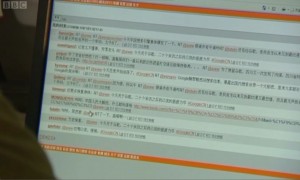
On last night's Newsnight, as part of a package on Ai Weiwei's release, they showed him using Twitter. Here's a screenshot.

ai weiwei dabr screenshot large
Click for larger image

That's Dabr! I'd recognise the orange colour scheme anywhere! It looks like he's using one of the many hundreds of installs of Dabr - this one looks like it has been localised to Chinese.

One interesting thing, none of the user's avatars appear. That's because, at a guess, the images are retrieved from Twitter's servers which are blocked by the Great Firewall of China.

Indeed, if we zoom in on the text we can see the letters "GFW".
ai weiwei dabr GFW
My Mandarin is too rusty to translate the rest - can anyone else help?

So, looks like my next addition to Dabr will be to use an image proxy to ensure avatar images make it through China's firewall!

Thanks to Kristian Carter for alerting me.

Awesome!

Displaying Twitter Photos via Entities

Twitter has announced that it will soon open up a native photo sharing service.

Rather than using an external service like Embed.ly to retrieve thumbnails, all the data is embedded within Twitter Entities.

So, if you request a status using "include_entities=true", you will be able to grab the image and display the thumbnail using the following code.

  1. function twitter_get_media($status) {
  2.    if($status->entities->media) {
  3.  
  4.       $url = $status->entities->media[0]->media_url_https;
  5.  
  6.       $width = $status->entities->media[0]->sizes->thumb->w;
  7.       $height = $status->entities->media[0]->sizes->thumb->h;
  8.  
  9.       $media_html = "<a href=\"" . $url . "\" target='_blank'>";
  10.       $media_html .=  "<img src=\"" . $url . ":thumb\" width=\"" . $width .
  11.          "\" height=\"" . $height . "\" />";
  12.       $media_html .= "</a><br />";
  13.      
  14.       return $media_html;
  15.    }        
  16. }

So, a tweet like this:


Will render like this (in Dabr):
Twitter Dabr Images

Notes

This is very rough and ready proof of concept code. Beware of the following:

  • This will only take the first image from the tweet.
  • Only images are supported - I'm not sure how their proposed video sharing will work.
  • There's no error checking.
  • In the above code, the https URL is used - if you want a non-SSL link, you'll need to remove the "_https"

Enjoy!

Dabr, Dabr, Everywhere...

I contribute code to Dabr - a mobile twitter client. It's a great project to keep my hand in the world of PHP, APIs, SVN, and all the other tools that are essential to the modern online world.

Dabr's strength for developers is two-fold

  1. Dead easy to install. Unzip the files, fill in your API key(s), upload, done.
  2. It's under an incredibly permissive Open Source MIT License. Essentially anyone can do anything with the code and they don't need to ask permission, nor contribute anything back to the code base.

It's a really popular tool. Although it's hard to count how many users are on the main Dabr server - not to mention all the clones - it's obvious that many people find it an indispensable way to access Twitter.

According to the New York Times, Rafinha Bastos is the most influential person on Twitter. Guess what client he uses?
rafinhabastos uses Dabr
Continue reading

Getting Images from a Foursquare Checkin

"Oi!" shouted Whatleydude, "Get Dabr to show images from foursquare checkins!"
"Righty-ho sir!" I said. I started coding furiously. Of course, things are never quite as simple as I first thought....

So, how do we go from http://4sq.com/fgIWov
to
James' Foursquare Checkin Image?

1 Expand the URL

Get your Bit.ly API Key.


http://api.bitly.com/v3/expand

   ?shortUrl=http://4sq.com/fgIWov
   &login=YOUR_BIT_LY_USERNAME
   &apiKey=YOUR_BIT_LY_API_KEY
   &format=txt

You can, if you prefer, get the info back in JSON or XML. See the Bit.ly API Expand Documentation.

2 The Foursquare URL

Bit.ly gives us the URL which includes a checkin ID and a signature.


http://foursquare.com/edent/checkin/4d7e5b4f9df3f04d7400c394

   ?s=afH3jJg3L9HpLqVIwiqp-YpNL5k

3 The Foursquare API Call

From this, we construct an API call to Foursquare. It looks like this


https://api.foursquare.com/v2/checkins/4d7e5b4f9df3f04d7400c394

   ?signature=afH3jJg3L9HpLqVIwiqp-YpNL5k
   &oauth_token=YOUR_FOURSQUARE_OAUTH_TOKEN

NOTE the Foursquare URL says ?s= whereas the API call requires ?signature=
That caused me more frustration than it should...

Getting your OAuth token is a little cumbersome - follow the steps at the Foursquare Developers site.

4 The JSON Response

I'll cut the cruft out of here, so you only see what you need to display images.
The response gives us the link to the full sized image - as well as several different sizes should you wish to display thumbnails.

  1. {
  2.   "meta":{
  3.      "code":200
  4.   },
  5.   "response":{
  6.      "checkin":{
  7.         },
  8.    ...
  9.    "photos":{
  10.       "count":1,
  11.       "items":[
  12.          {
  13.             "id":"4d7e5b4f9df3f04d7400c394",
  14.             "createdAt":1300184596,
  15.             "url":"http://playfoursquare.s3.amazonaws.com/pix/A.jpg",
  16.             "sizes":{
  17.                "count":4,
  18.                "items":[
  19.                   {
  20.                      "url":"http://playfoursquare.s3.amazonaws.com/pix/B.jpg",
  21.                      "width":720,"height":540
  22.                   },
  23.                   {
  24.                      "url":"http://playfoursquare.s3.amazonaws.com/derived_pix/C.jpg",
  25.                      "width":300,"height":300
  26.                   },
  27.                   {
  28.                      "url":"http://playfoursquare.s3.amazonaws.com/derived_pix/D.jpg",
  29.                      "width":100,"height":100
  30.                   },
  31.                   {
  32.                      "url":"http://playfoursquare.s3.amazonaws.com/derived_pix/E.jpg",
  33.                      "width":36,
  34.                      "height":36
  35.                   }
  36.                ]
  37.             },

5 Gotchas

Again, nothing in life is easy. Not all foursquare checkins have an image associated with them. In which case, we can do one of three things.

  1. Display no image
  2. Display the user's avatar - if it's public
  3. Display an image of the venue - or one of the icons associated with it.

6 Embed.ly

Dabr uses the awesome Embedly service. Rather than having hundreds of different regular expressions and API calls to get embedded images, Embed.ly gives us a single end point to call.
So, rather than rewrite huge chunks of Dabr's code, I've submitted this to the clever-clogs behind Embed.ly - that way, everyone can benefit.

Any questions, comments, or clarifications - please let me know in the comments box.

Twitter API - pagination and IDs

Looking for some Twitter API help.  Bit of a geeky post, this...

Pagination is the act of splitting data into logical  pages. Suppose I had a list of item, numbered 0 - 99.  If I want 20 items per page, it's trivial to see that pagination looks like:

p1 = 0-19
p2 = 20-40
p3 = 41-61
p4 = 62-82
p5 = 83-99

If I wanted to start at, say, page 55 - pagination would look like:

p1 = 55-75
p2 = 76-96
p3 = 97-99

Easy, right?  So why am I telling you this?

Twitter Timeline

Imagine that those items are Twitter Status ID.  Each one represents a tweet in your timeline.

Twitter will allow us to "page" back and forth through our timeline. If we say status ID 80 is the most recent post in our timeline, and we want to see 20 tweets at a time, pagination would look like this.

p1 = 80-60
p2 = 60-40
... etc.

Normally, that would be fine.

The only issue is that friends are posting all the time.  Imagine we start with tweets 80-60.  We go to page 2, but in the meantime, 5 new tweets have been made.

p1 = 80-60
p2 = 65-45

The user sees 5 tweets she has already read.  Not desirable.

If 20 tweets had been made before clicking on the "next" button, this is what happens.

p1 = 80-60
p2 = 80-60

Max_ID To The Rescue (AKA, the easy bit)

Luckily, Twitter allows us to use a max_id parameter in our API calls.  This says "Get the tweets older than this number."

http://api.twitter.com/1/statuses/home_timeline.json?max_id=123465789

So, using max_id we can ensure that the user never has to read the same tweet twice.  Instead of dumbly using pages, we call the specific tweets we want.

p1 max_id=80 = 80-60
p2 max_id=60 = 60-40

Easy!  We just use the oldest tweet on the page as the max_id parameter when we call the next page.

Looking To The Future (AKA, where it all goes horribly wrong)

So far, we've looked at stepping back in time.  Seeing older tweets.  Suppose we want to see newer tweets?

Twitter provides us with a since_id parameter for API calls.  This says "Get the tweets newer than this number."

Unfortunately, it doesn't work.  Well, it works but not the way I expected it to!

Suppose our user is deep down in her tweets, this is how I would expect since_id to work

max_id=60  = 60-40
 (So, let's show any more recent tweets)
since_id=60 = 80-60

We see the 20 tweets that occured since the since_id.  Right?  Wrong!  This is what happens?

max_id=60  = 60-40
(So, let's show any more recent tweets)
since_id=60 = 100-80

What?

An Explanation

The since_id retrieves tweets starting with the most recent.  It stops when it reaches the since_id.

I don't know the max_id that I'm looking for, so I can't call that.

I could call the most recent 200 tweets and look for the 20 I need.  That's wasteful in terms of bandwidth and processing - there's also no guarantee that the since_id will be in there.

So, I have a problem.  The "Older" link in my Twitter application will work.  The "Newer" links won't.

Any suggestions?